

Guides
Share with your team
Let teammates read the sessions behind each other's commits, through the git remote you already push to.
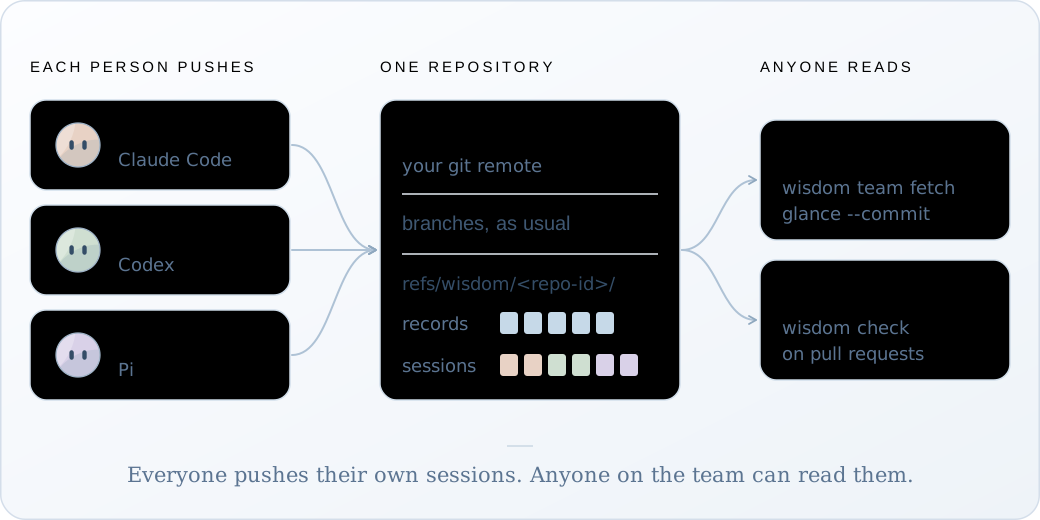
Share a session sends one file by hand. Team mode does it with every push: each commit’s record and guide, and the sessions behind it, go to your own git remote as hidden refs. A teammate fetches them and reads your commit the way you do. Nothing goes to Wisdom.
It’s opt-in. A repository is in team mode while it has a committed wisdom-team.json;
without one, Wisdom changes no commit message and pushes nothing.
Set it up
Section titled “Set it up”-
Turn it on
Section titled “Turn it on”One person adds the file and pushes it:
Terminal wisdom team initgit add wisdom-team.jsongit commit -m "Turn on Wisdom team mode"git push -
Connect each clone
Section titled “Connect each clone”Everyone, you included, pulls the file and runs
connectagain:Terminal git pullwisdom connectNow that the file is there, this also installs three git hooks:
Output Team mode: Wisdom's git hooks are in /home/maya/invoice-api/.git/hooks. Turn them off with: wisdom team hooks off -
Commit and push as usual
Section titled “Commit and push as usual”Terminal git pushOutput Wisdom: 1 commit record and 1 session version(s) sent to origin. -
Read a teammate’s commit
Section titled “Read a teammate’s commit”Terminal git pullwisdom team fetchwisdom glance --commit a4c91e2Output 1 teammate session updated, 0 removed by the team's deletion list, 3 commit records here.Their sessions are read-only copies here. Open the steps a commit names with
wisdom open t2/c1 --capture <session>, as with your own.
What happens on each commit
Section titled “What happens on each commit”- The commit. Wisdom adds one line to the message,
Wisdom-Record: r-…. It follows the commit through an amend, a rebase and a squash merge, so the record can be found again. - After it. A background job keeps the commit’s record. If the commit has agent work, a model writes its guide: Claude Haiku 5.5 through your own Claude Code, about $0.001 to $0.008 a guide in Wisdom’s tests. The commit doesn’t wait for it.
- The push. Your
git pushwaits for any guide still being written, up to five minutes, then sends the sessions and then the records. If any of this fails, Wisdom says so and your push goes ahead.
Only commits made in team mode travel. Work you recorded before wisdom-team.json was
committed stays on your machine.
To send without a git push, run wisdom team push.
What a push sends
Section titled “What a push sends”| Sent | Never sent |
|---|---|
| The sessions a pushed commit’s record names | Sessions no pushed commit names |
| Each commit’s record and guide | Your .wisdom/ folder |
Your git name and email, labelled “git config”, since git doesn’t verify them. Set identity to false to leave them out. |
Any login |
Each session goes through the same export as wisdom share, and every possible secret is
redacted automatically, since there’s no one to ask during a push. The records are scanned the same way,
since a guide can quote a request. Your own recording is never changed.
Turn off the model
Section titled “Turn off the model”wisdom guide offYour commits then get a plain guide that Wisdom writes from the record: each piece’s step and
what was asked in that turn. It costs nothing, but says nothing about why beyond those requests.
wisdom guide on turns the model back on. It only changes your own clone.
To use another writer for the whole team (Codex, an API key, a local model), set guides in
wisdom-team.json.
Check pull requests in CI
Section titled “Check pull requests in CI”wisdom check needs no recordings, only the repository. For GitHub Actions:
name: wisdomon: pull_requestjobs: guides: runs-on: ubuntu-latest steps: - uses: actions/checkout@v4 with: { fetch-depth: 0 } - uses: actions/setup-node@v4 with: { node-version: 24 } - run: npm install -g @oqura/wisdom@beta # @beta until 0.6.0 is the default - run: wisdom check --range origin/${{ github.base_ref }}..HEADIt prints one line per commit and fails when a commit with agent work has no guide, has one that didn’t pass Wisdom’s check, or names a session that isn’t on the remote. A commit made without Wisdom isn’t counted against you.
Squash merges. GitHub gives the squashed commit a new hash, so it has no record of its own.
Its message keeps the Wisdom-Record: lines of the commits inside it, and glance --commit
and the check read those records instead. Keep the lines when you edit a squash message, or set
the default squash message to “Pull request title and commit details” (Settings > General >
Pull Requests).
Remove a session
Section titled “Remove a session”wisdom team delete 3f9c2a71This removes it from the remote and adds it to the team’s deletion list, so no clone pushes
it back. Teammates’ copies go at their next wisdom team fetch. Your own recording is kept.
To remove old sessions as a habit, set retentionDays in wisdom-team.json and run
wisdom team prune. It keeps any session a pushed commit still names.
Limits
Section titled “Limits”- Tested with GitHub, not yet GitLab.
- A pull request from a fork can’t send sessions: forks can’t push hidden refs.
- The default writer needs Claude Code installed and logged in. Without it, commits with agent
work get no guide and say why;
wisdom guide offgives them the plain one. - A session is pushed whole, about 100 KB for a typical one. Keep one session per task, so unrelated work doesn’t travel with it.
To leave team mode, remove wisdom-team.json and run wisdom team hooks off in each clone.