

Getting started
Quick start
Connect a project, use your agent as usual, and read what it did. About five minutes.
Record one session with your normal agent login, then read it back in the terminal, in the dashboard, and through your agent.
You need:
- Wisdom installed (Node.js 24 or newer).
- A project folder, ideally a git repository.
- Claude Code, Codex or Pi.
Rather let your agent install and connect it? Paste this into Claude Code, Codex or Pi, started in your project. When it’s done, restart the agent there and go on from step 2.
Set up Wisdom (npm package @oqura/wisdom) in this project:1. Run `node --version`. If it is older than 24, stop and tell me.2. Install it globally: `npm install -g @oqura/wisdom`. Do not use npx. On Windows PowerShell, use `npm.cmd` and `wisdom.cmd`.3. In the project's top folder, run `wisdom connect` and show me its output.4. Run `wisdom doctor` and tell me any problem it finds, with the fix it prints.Do not edit any other files.-
Connect your project
Section titled “Connect your project”Terminal cd your-projectwisdom connectWisdom adds its hook and reading skill to the project’s own agent settings, keeps those files out of git, and tells you how to start each agent:
Output Wisdom is set up in /home/maya/invoice-api. Start your agent here as you always do, with your own login:Claude Code claude (start it in this folder, not a subfolder)Codex codex (trust this project if it asks, then review Wisdom's hooks once in /hooks)Pi pi (start it in this folder, and trust this project when it asks)Wisdom added its hook and reading skill to: .claude/settings.local.json, .codex/hooks.json, .pi/settings.json, .claude/skills/wisdom-ledger, .agents/skills/wisdom-ledger.They are listed in .git/info/exclude, so git ignores them and they never reach your teammates. wisdom disconnect removes them. -
Use your agent as usual
Section titled “Use your agent as usual”Start it from the project’s top folder.
Terminal claudeNothing else to set up. A session started in a subfolder isn’t recorded, because Claude Code loads project settings only from the top folder.
Terminal codexThe first time, Codex asks you to trust the project. Then run
/hooksand approve Wisdom’s hooks. You do this once per project.Terminal piThe first time, Pi asks you to trust the project.
Ask it for something small, such as a fix with a test.
-
Read the session
Section titled “Read the session”In a second terminal, in the same folder:
Terminal wisdom glance latestYou get one entry per turn: your prompt, the start of the agent’s reply, and what happened (tool calls, failures, changed files). To read a turn in full:
Terminal wisdom open t1 --capture latestThis shows the turn in the order it happened: each tool call with its full input and output, the reply, and every file change as a diff.
-
Open the dashboard
Section titled “Open the dashboard”Terminal wisdom dashboardIt prints an address,
http://127.0.0.1:7435by default. Open it in your browser to see the session update while your agent works.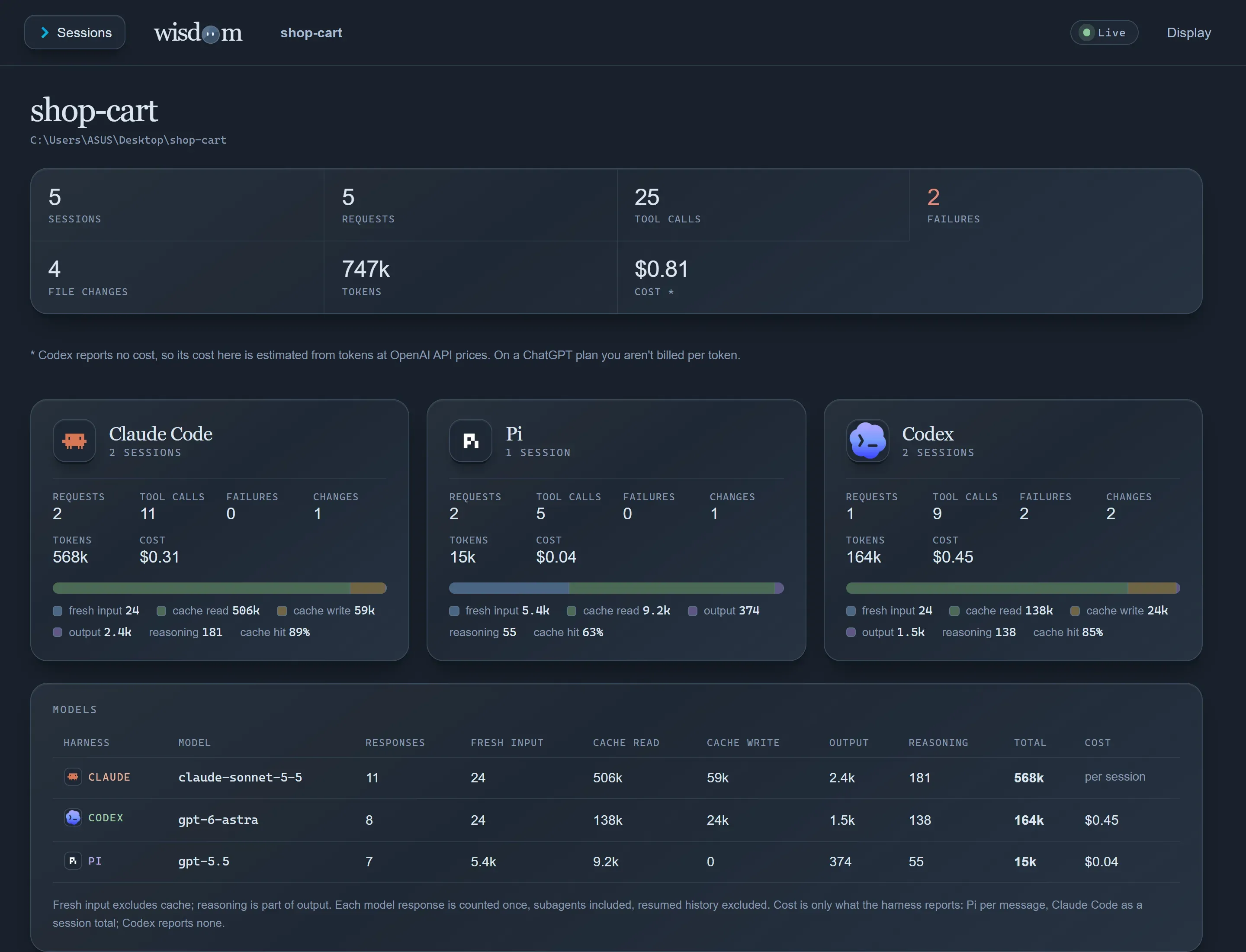
-
Ask your agent about it
Section titled “Ask your agent about it”The reading skill from step 1 lets any connected agent read past sessions, including ones recorded from a different agent. Try:
Prompt Read the last Wisdom session. What did it change, and did the tests pass?