

Guides
Read a session
See a session at a glance, open the turn that matters, and read its labels.
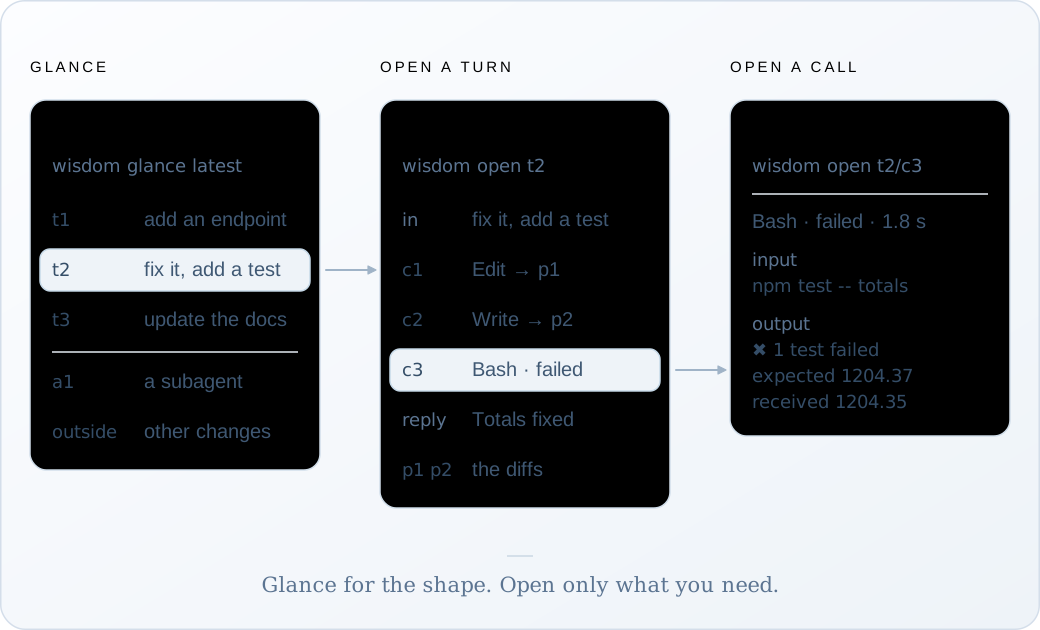
Reading a session takes two moves: glance to see its shape, then open the part that matters. Your agents use the same two moves, through their skill.
wisdom glance # every recorded session, newest firstwisdom glance latest # one session: its shape and every turnwisdom open t2 --capture latest # turn 2, wholeName a session by its full ID, by its first 8 or more characters, or as latest (the newest
session with a turn). Every command finds .wisdom/ from the folder you’re in, like git
finds .git.
To start from a commit instead, see Read a commit.
Positions
Section titled “Positions”Everything in a session has a short address. A glance shows them; open takes them.
| Position | What it opens |
|---|---|
t3 |
Turn 3: your third prompt and everything the agent did until it answered |
t3/c2 |
The second tool call of turn 3, its full input and output |
a1 |
The first subagent, laid out like a turn |
a1/c2 |
A tool call of that subagent |
outside |
Calls and file changes outside any turn |
p1, p2… label the file changes inside a turn. They aren’t addresses: open the turn or the
call to see them.
Opening a turn
Section titled “Opening a turn”A turn comes back in recorded order: thinking, each call with its result, the reply, and then all the turn’s file changes together, as diffs. An example:
❯ wisdom open t2 --capture latestt2 · session 3f9c2a71 · version 412 · 168,204 tokensin        fix it and add a test
thinking  redacted · 2.1 s (it happened; its text was not recorded)
c1  Edit src/totals.ts · ok · 12 ms · → p1    input and output repeat p1 · open t2/c1 to read them
c2  Write test/totals.test.ts · ok · 9 ms · → p2    input and output repeat p2 · open t2/c2 to read them
c3  Bash · failed · 1.8 s    input     {"command":"npm test -- totals"}    output        ✖ rounds a 40-line invoice once (2.1 ms)          expected 1204.37, received 1204.35
c4  Edit src/totals.ts · ok · 10 ms · → p3    input and output repeat p3 · open t2/c4 to read them
c5  Bash · ok · 1.6 s    input     {"command":"npm test -- totals"}    output        ✔ rounds a 40-line invoice once (1.9 ms)
reply     Totals now round once, after the sum. A new test covers a 40-line invoice.
p1  src/totals.ts · modify · +2 −2 · observed during c1    --- src/totals.ts    +++ src/totals.ts    @@ -8,6 +8,6 @@     export function invoiceTotal(lines: Line[]): number {    -  return lines.reduce((sum, l) => sum + round(l.qty * l.price), 0);    +  const raw = lines.reduce((sum, l) => sum + l.qty * l.price, 0);    +  return round(raw);     }
complete · 29 lines
Each piece of evidence is shown once. An edit’s input is its diff, so the call points to
p1 instead of repeating it. A file the agent read is listed by size; open the call to read it.
In a terminal, or piped
Section titled “In a terminal, or piped”In a terminal, glance and open are coloured and fitted to its width. A long prompt or
tool output is folded, and the fold names the command that shows it whole. No word is
changed.
Piped to a file or another program, or with --plain, you get the exact text your agents
read: uncoloured and unfolded.
wisdom open t2 --capture latest --plain > turn.txtReading the labels
Section titled “Reading the labels”These labels say how much the record can tell you:
| Label | What it means |
|---|---|
observed during c1 |
The file changed while that call ran. Timing, not proof the call made it. |
external-or-unknown |
The file changed while no tool was running: you, your editor, another process. |
thinking redacted |
The agent thought, but its text wasn’t recorded (Claude Code omits it; Codex encrypts it). |
not recorded |
A gap in the recording, with the reason. |
no result recorded |
The call never reported back. Not the same as success. |
ok |
The tool reported success. Not proof the code is right. |