This is the full developer documentation for Wisdom
# The intent behind every change your coding agent makes
> Wisdom records Claude Code, Codex and Pi sessions on your machine and links every file change to the request and the commands behind it. You read them in a dashboard; your agents read them through a skill.
## Record your first session
[Section titled “Record your first session”](#record-your-first-session)
Install and connect
```sh
npm install -g @oqura/wisdom
cd your-project
wisdom connect
claude # or codex, or pi: use it as usual
```
Then read what happened: the session at a glance, then any turn in full, or start from the commit it made. Below is an example session, written to show the format.
* glance
\~/invoice-api
```ansi
❯ wisdom glance latest
session 3f9c2a71-8d4e-4b1a-9c55-2e7f0b6d1a90 · claude-code 2.1.319 · closed (idle) · version 412
resume with: wisdom resume 3f9c2a71-8d4e-4b1a-9c55-2e7f0b6d1a90
workspace /home/maya/invoice-api
started 2026-11-11 09:12Z · ended 2026-11-11 09:41Z
3 turns · 14 tool calls · 1 failed · 3 changes · 0 subagents · 412,906 tokens · $1.8420 reported
t1 in totals are off by a cent on some invoices, find out why
out Each line item is rounded before the sum, so cents drift on long invoices.
6 tool calls · no changes
t2 in fix it and add a test
out Totals now round once, after the sum. A new test covers a 40-line invoice.
7 tool calls · 1 failed · changed src/totals.ts, test/totals.test.ts
t3 in commit it
out Committed as a4c91e2 "fix: round invoice totals once".
1 tool call · no changes
complete · 17 lines
```
* open t2
\~/invoice-api
```ansi
❯ wisdom open t2 --capture latest
t2 · session 3f9c2a71 · version 412 · 168,204 tokens
in fix it and add a test
thinking redacted · 2.1 s (it happened; its text was not recorded)
c1 Edit src/totals.ts · ok · 12 ms · → p1
input and output repeat p1 · open t2/c1 to read them
c2 Write test/totals.test.ts · ok · 9 ms · → p2
input and output repeat p2 · open t2/c2 to read them
c3 Bash · failed · 1.8 s
input {"command":"npm test -- totals"}
output
✖ rounds a 40-line invoice once (2.1 ms)
expected 1204.37, received 1204.35
c4 Edit src/totals.ts · ok · 10 ms · → p3
input and output repeat p3 · open t2/c4 to read them
c5 Bash · ok · 1.6 s
input {"command":"npm test -- totals"}
output
✔ rounds a 40-line invoice once (1.9 ms)
reply Totals now round once, after the sum. A new test covers a 40-line invoice.
p1 src/totals.ts · modify · +2 −2 · observed during c1
--- src/totals.ts
+++ src/totals.ts
@@ -8,6 +8,6 @@
export function invoiceTotal(lines: Line[]): number {
- return lines.reduce((sum, l) => sum + round(l.qty * l.price), 0);
+ const raw = lines.reduce((sum, l) => sum + l.qty * l.price, 0);
+ return round(raw);
}
complete · 29 lines
```
* glance --commit
\~/invoice-api
```txt
❯ wisdom glance --commit a4c91e2
commit a4c91e2b7f30 · fix: round invoice totals once · committed 2026-11-11 09:40Z · version 412
parent 7d2e9b1c04aa · 3 files · 3 pieces: 2 from recorded steps, 1 not recorded
record kept when the commit was made, 2026-11-11 09:40Z
the commit's own diff: git show a4c91e2b7f30
README.md · modify · +1 −0 · not recorded
src/totals.ts · modify · +2 −1
@@ -9,1 +9,2 @@ t2/c1, t2/c4 in session 3f9c2a71
test/totals.test.ts · create · +14 −0
@@ -0,0 +1,14 @@ t2/c2 in session 3f9c2a71
sessions
3f9c2a71-8d4e-4b1a-9c55-2e7f0b6d1a90 claude-code t2/c1, t2/c2, t2/c4 · window t1–t3
window: from the start of these sessions (no earlier commit of yours on this branch), up to this commit
To read a step, open its position in its session, such as {"capture":"3f9c2a71","open":"t2/c1"}.
guide · plain, built from the record now, no model · derived, not evidence · not stored; a model guide on request: wisdom guide a4c91e2b7f30
## Summary
fix: round invoice totals once. Written by Wisdom from the commit's record, without a model: which recorded step made each piece and what was asked in that turn. It does not say why beyond those requests.
## Items
- README.md (modify) · not recorded
No recording explains this change.
- src/totals.ts @@ -9,1 +9,2 @@ · t2/c1, t2/c4 in session 3f9c2a71
Made by [t2/c1 3f9c2a71] (claude-code). Asked in t2: "fix it and add a test". Made by [t2/c4 3f9c2a71] (claude-code).
- test/totals.test.ts @@ -0,0 +1,14 @@ · t2/c2 in session 3f9c2a71
Made by [t2/c2 3f9c2a71] (claude-code). Asked in t2: "fix it and add a test".
complete · 28 lines
```
Each part of the commit points to the step that wrote it. New in 0.6.0: see [Read a commit](/wisdom-docs/guides/read-a-commit/).
## What you get
[Section titled “What you get”](#what-you-get)
* Prompts, replies, tool calls and file diffs, recorded as they happened. Nothing is summarized, and gaps in the recording are marked where they occur.
* One way to read Claude Code, Codex and Pi sessions: for you in the terminal or the dashboard, for your agents through a skill.
* From any commit back to the steps that made it, with `wisdom glance --commit` ([new in 0.6.0](/wisdom-docs/guides/read-a-commit/)).
* Hooks that never block your agent. If the background service is down, events wait on disk.
* Everything stays in the project’s `.wisdom/` folder until you choose to share it.
Start with the [quick start](/wisdom-docs/getting-started/quick-start/), or read [how it works](/wisdom-docs/concepts/how-it-works/).
# How it works
> How an event travels from your agent's hook to a record you can read.
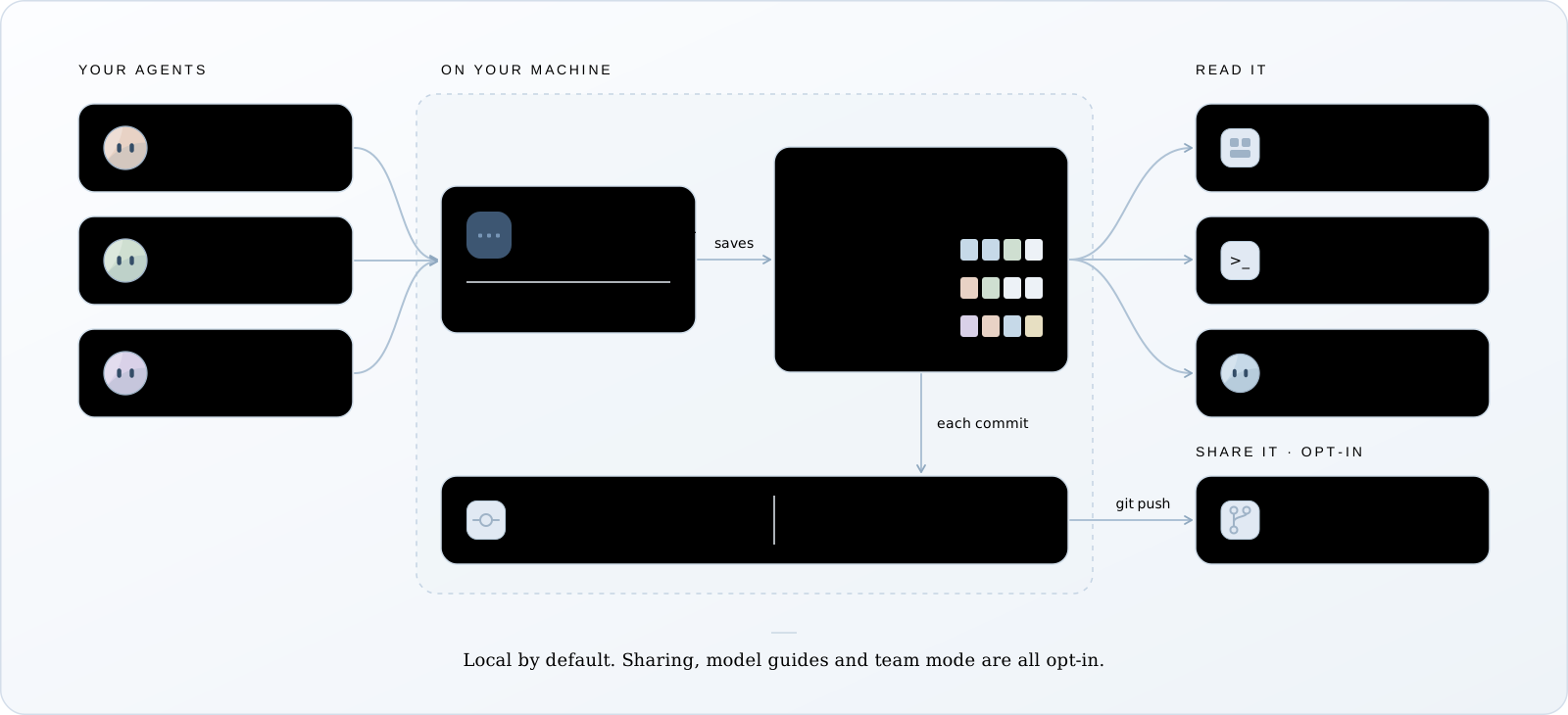
Wisdom has three parts: hooks inside your agent, a background service on your machine, and the readers (the CLI, the dashboard and your agents’ skill). This page follows one event through them.
## One event’s path
[Section titled “One event’s path”](#one-events-path)
**Hook fires**a prompt, a tool starting or finishing
**Daemon**finds the session the event names
**Files diffed**what changed while the tool ran
**Stored**SQLite record + payload on disk
1. The agent’s own hook fires. Claude Code and Codex call Wisdom’s hook; Pi loads Wisdom’s extension. The hook posts the event to the background service and returns at once.
2. The service finds the session. Every event names its agent’s session ID. The first event opens a record for it; a later one, after a pause or a resume, continues it.
3. The service compares files. It keeps a baseline of the project’s files in memory. When a tool finishes, it checks what changed and stores a diff, labelled with the tool call that was running.
4. The record goes into SQLite. Large bodies (tool output, diffs) are saved as files named by their SHA-256 hash. The agent’s own transcript is copied byte for byte beside it.
If the service can’t take the event, the hook writes it to `.wisdom/spool/`, starts the service, and returns.
## One session, one record
[Section titled “One session, one record”](#one-session-one-record)
Wisdom records each session under the agent’s own session ID; there’s no second ID. Two sessions running at once, such as a background `/fork`, are two records. A record closes when the agent ends the session, or after 10 idle minutes, and the next event continues it.
## Who changed a file
[Section titled “Who changed a file”](#who-changed-a-file)
Wisdom sees when a file changed, not who changed it:
* `observed during c1`: the change happened while tool call `c1` was running. Usually that call made it, but timing isn’t proof.
* `external-or-unknown`: no tool was running. You, your editor, or another process.
Two agents working in one folder see each other’s changes. Wisdom labels them honestly, but can’t always tell them apart. When you [read a commit](../../guides/read-a-commit/), each change goes to the session whose own tool call named the file or held its text; when none did, every session that saw it is listed.
## From sessions to commits
[Section titled “From sessions to commits”](#from-sessions-to-commits)
When you commit, Wisdom matches each change in the commit to the recorded step that produced those exact file contents, and keeps the answer as a record in your repository’s `.git`, under `refs/wisdom/records/`. It’s never on a branch, and a normal push doesn’t send it. See [Read a commit](../../guides/read-a-commit/).
In [team mode](../../guides/share-with-your-team/), which you turn on per repository, your `git push` also sends these records and the sessions they name to your own git remote, with secrets redacted. Teammates and CI read them from there.
## Reads that hold still
[Section titled “Reads that hold still”](#reads-that-hold-still)
Every record gets a version number, and every answer states the version it read. Pass it back with `--at` and you see exactly the same evidence, even while the session keeps recording. This is how a long answer can be read in pages without gaps or repeats.
# Privacy
> Where your recordings live, what's in them, and the only ways they leave your machine.
Wisdom keeps exact recordings, which is what makes them useful, and also why they need care. This page covers where they live and how to keep them private.
## Everything stays local
[Section titled “Everything stays local”](#everything-stays-local)
Recordings live in the project’s `.wisdom/` folder. The background service and the dashboard listen only on `127.0.0.1`, and every request needs a token stored in `.wisdom/daemon.json`. By default, nothing is uploaded and no model reads your sessions. The two exceptions below, commit guides and team mode, are both ones you turn on.
## What’s in `.wisdom/`
[Section titled “What’s in .wisdom/”](#whats-in-wisdom)
Your sessions **exactly as they happened**: prompts, tool output, diffs, transcripts. If a key appeared in a command’s output, it’s in there. In a tracked project, `.wisdom/` also holds each agent’s login.
Treat .wisdom/ like a password
Git ignores it, but zips, copies, shared drives and synced folders don’t. Keep it out of them.
## The only ways out
[Section titled “The only ways out”](#the-only-ways-out)
A recording leaves your machine only when you run one of these:
| Command | Writes | Secret check |
| -------------------------------------------------------------- | --------------------------------------------------- | ---------------------------- |
| `wisdom share` | One file for a teammate, with no logins | Yes |
| `wisdom export` | A Markdown document | Yes |
| `git push`, in [team mode](../../guides/share-with-your-team/) | Sessions and commit records, to your own git remote | Yes, redacted without asking |
The check lists each value that looks like a key, token, password or email address. With `share` and `export` you choose to redact it, keep it, or cancel; a team-mode push redacts all of them, since nobody is there to answer. Redaction changes only what leaves, never your recording. See [Share a session](../../guides/share-a-session/).
Commit records are kept in your own `.git` and a normal `git push` never sends them, outside team mode or in it. `git push --mirror` sends every ref, so it sends them too.
## Commit guides
[Section titled “Commit guides”](#commit-guides)
A model writes a [commit guide](../../guides/read-a-commit/#guides) only when you ask: `wisdom guide `, `wisdom guide on`, or team mode, where it’s on unless you run `wisdom guide off`. The default writer reads the commit’s sessions through your own Claude Code login, so that text goes to the model’s provider, as in any Claude Code session. A team that sets its own `guides.command` sends it wherever that command does. The plain guide uses no model.
## Your global settings
[Section titled “Your global settings”](#your-global-settings)
Wisdom never edits `~/.claude`, `~/.codex` or `~/.pi/agent`. `wisdom connect` writes only to the project’s own settings, kept out of git, and `wisdom disconnect` removes exactly that. The one exception is yours to choose: deleting a connected session with **Also delete the harness’s own copy** ticked.
# What gets recorded
> What Wisdom keeps, what it can't see, and how it marks the difference.
Wisdom records what the agent reports and what it can observe on disk. Where it can’t see something, it marks the gap in place.
## Principles
[Section titled “Principles”](#principles)
1. Records are only added. Transcripts are copied byte for byte. Nothing is edited later, except when you delete a session.
2. Recordings are never summarized or generated. What you read is what happened. The one thing a model writes is a [commit guide](../../guides/read-a-commit/#guides), only when you ask for one or turn on team mode, and it’s always labelled `derived, not evidence`.
3. A gap is listed as `not recorded`, with the reason.
4. Labels state only what was observed. A change seen during a tool call is timing, not authorship, and a tool that finished is not proof the code is right.
## Kept
[Section titled “Kept”](#kept)
| Item | Recorded as |
| ---------------------- | ------------------------------------------------------------------------------------------------------------------------------- |
| Your prompts | In full, as typed |
| Replies | In full |
| Thinking | When the agent records it; otherwise `redacted` with its duration |
| Tool calls | Full input and output, status, duration |
| File changes | A unified diff of each one, with the tool call it happened during |
| Subagents | Their task, calls, changes and report |
| Tokens and cost | As the agent reports them |
| The agent’s transcript | A byte-for-byte copy |
| Your commits | A record in your repository’s `.git` linking each change to the step that made it ([new in 0.6.0](../../guides/read-a-commit/)) |
## Not seen
[Section titled “Not seen”](#not-seen)
| What | Why | How it shows |
| ----------------------------------- | ------------------------------------------------ | --------------------------------------------- |
| Thinking text the provider encrypts | The agent never has it in plain text | `thinking redacted` |
| Changes while the service was down | No baseline to compare against | `not recorded delivered-late` |
| Changes between visits | Nothing was recording | `not recorded not-recording-between-visits` |
| A session whose hooks never ran | Only the agent’s file exists | `in (from session file)`, `not-recorded-live` |
| Edits by other processes | Not a tool call | `external-or-unknown` |
| A tool that never reported back | No result arrived | `no result recorded` |
| Very large projects | Past 10,000 files or 64 MiB, files aren’t diffed | `not recorded` with the limit |
Folders such as `.git`, `node_modules`, `dist` and `build` are never diffed. Add your own in [`.wisdomignore`](../../guides/record-sessions/#leaving-files-out).
## Per agent
[Section titled “Per agent”](#per-agent)
| | Claude Code | Codex | Pi |
| --------------- | ------------- | ---------------------------------- | ------------- |
| Reports through | Hooks | Hooks, once trusted | Extension |
| Thinking | When recorded | Usually encrypted | When recorded |
| Cost | Per session | Not reported (dashboard estimates) | Per message |
Versions and details: [Harness support](../../reference/harness-support/).
# Installation
> Install Wisdom with npm, check it works, update or remove it.
Wisdom is one npm package. Install it once per machine, then connect each project you want to record.
## Requirements
[Section titled “Requirements”](#requirements)
* **Node.js 24 or newer.** Wisdom uses the SQLite built into Node, so there’s no database to install. On an older Node, every `wisdom` command stops with `Wisdom needs Node.js 24 or newer. This is v22.x.` Check yours with `node --version`.
* **Claude Code, Codex (0.164.0 or newer) or Pi.**
## Install
[Section titled “Install”](#install)
Terminal
```sh
npm install -g @oqura/wisdom
wisdom --version
```
The same commands work on macOS, Linux and Windows. If Windows PowerShell blocks scripts, use `npm.cmd` and `wisdom.cmd` in their place.
Install globally, not with npx
Each project’s hooks store the path to the installed copy of Wisdom. An `npx` copy lives in a cache folder that can disappear, and recording stops with it.
## Check a project
[Section titled “Check a project”](#check-a-project)
Terminal
```sh
wisdom doctor
```
Run it inside a project. It checks the background service, each agent’s hooks and version, and any events waiting to be recorded. It changes nothing, and prints the command that fixes each problem it finds.
## Update
[Section titled “Update”](#update)
Terminal
```sh
wisdom daemon stop # in each project
npm install -g @oqura/wisdom@latest
wisdom doctor
```
Your recorded sessions are kept across updates.
Switched Node versions?
Version managers such as nvm keep global packages per Node version. If you switch, install Wisdom again under the new version, then run `wisdom init` in the project to point its hooks at the new copy.
## Uninstall
[Section titled “Uninstall”](#uninstall)
1. In each connected project, remove Wisdom’s hooks and stop the service:
Terminal
```sh
wisdom disconnect
wisdom daemon stop
```
If you turned on commit guides or team mode, also remove Wisdom’s git hooks: `wisdom guide off` or `wisdom team hooks off`. `disconnect` leaves them in place.
2. Remove the package:
Terminal
```sh
npm uninstall -g @oqura/wisdom
```
Your recordings stay in each project’s `.wisdom/` folder until you delete it. Wisdom never changes `~/.claude`, `~/.codex` or `~/.pi/agent`, so your agents work exactly as before.
Next: [Quick start](../quick-start/).
# What is Wisdom?
> An open-source recorder for coding agents, and the way you and your agents read what it recorded.
Wisdom records your coding agent’s sessions on your own machine: what you asked, what the agent ran, which files it changed, and what it said it did. You read those sessions in the terminal or a local dashboard, and your agents read them through a skill, so the next agent starts from what actually happened.
It works with:
* [Claude Code](https://code.claude.com)
* [Codex CLI](https://developers.openai.com/codex)
* [Pi](https://pi.dev)
Terminal
```sh
npm install -g @oqura/wisdom # Node.js 24 or newer
cd your-project
wisdom connect # then start your agent here as usual
```
That’s the whole setup. [Quick start](../quick-start/) walks through it and reads your first session back.
## What you can do with it
[Section titled “What you can do with it”](#what-you-can-do-with-it)
* Review an agent’s work against the request behind it, not only against its final reply.
* See the test that failed before the fix, and the approach the agent tried and dropped.
* Hand unfinished work to another agent, even a different one, that reads the session first.
* Review a teammate’s pull request with the session behind each commit, in [team mode](../../guides/share-with-your-team/).
* Find the session behind a change weeks later, [starting from its commit](../../guides/read-a-commit/), from the terminal or from any agent.
A diff shows what changed. The session shows why, and it’s gone once the terminal closes unless something records it.
## How it works
[Section titled “How it works”](#how-it-works)

1. Your agent’s own hooks send each event (a prompt, a tool call, its result) to a small background service on `127.0.0.1`.
2. The service saves it in the project’s `.wisdom/` folder, together with a byte-for-byte copy of the agent’s transcript and a diff of every file change it observed.
3. You read it in the dashboard or the terminal. Your agents read it through a skill Wisdom gives them.
4. When you commit, Wisdom keeps a record in your repository’s `.git` that links each change to the step that made it. In [team mode](../../guides/share-with-your-team/), your `git push` shares those records and their sessions with your team.
More detail in [How it works](../../concepts/how-it-works/).
## Where to start
[Section titled “Where to start”](#where-to-start)
[Installation](../installation/)Node.js 24 and one npm command.
[Quick start](../quick-start/)Record your first session and read it back, in about five minutes.
[Record sessions](../../guides/record-sessions/)The two ways to record, and which one to pick.
For coding agents, these docs are also published as plain text: [`llms.txt`](/wisdom-docs/llms.txt) is the index, and [`llms-full.txt`](/wisdom-docs/llms-full.txt) has every page in one file.
## Common questions
[Section titled “Common questions”](#common-questions)
Does it slow down my agent?
Each hook sends one request to a service on your own machine. If the service doesn’t answer, the hook writes the event to disk and the agent carries on. Wisdom never blocks your agent.
Does it send my code or prompts anywhere?
No. Everything stays in the project’s `.wisdom/` folder. A recording leaves your machine only when you run [`wisdom share` or `wisdom export`](../../guides/share-a-session/), or push in [team mode](../../guides/share-with-your-team/), which you turn on per repository. All of them check for secrets first. See [Privacy](../../concepts/privacy/).
Does it use a model, or cost tokens?
Recording uses no model and costs nothing. Nothing is summarized. When one of your agents reads a session, that reading counts toward your agent’s own usage, like any other command output.
The one place a model writes anything is a [commit guide](../../guides/read-a-commit/#guides), and only when you ask for one or turn on team mode. By default it runs through your own Claude Code.
Do I need to change how I start my agent?
No. After `wisdom connect`, you start `claude`, `codex` or `pi` as usual, with your own login. See [Record sessions](../../guides/record-sessions/) for the one rule each agent has.
Does it change my global agent settings?
No. Wisdom never edits `~/.claude`, `~/.codex` or `~/.pi/agent`. It writes only to the project’s own settings, keeps them out of git, and `wisdom disconnect` removes exactly that.
# Quick start
> Connect a project, use your agent as usual, and read what it did. About five minutes.
Record one session with your normal agent login, then read it back in the terminal, in the dashboard, and through your agent.
You need:
* Wisdom [installed](../installation/) (Node.js 24 or newer).
* A project folder, ideally a git repository.
* Claude Code, Codex or Pi.
**Rather let your agent install and connect it?** Paste this into Claude Code, Codex or Pi, started in your project. When it’s done, restart the agent there and go on from step 2.
Setup prompt
```txt
Set up Wisdom (npm package @oqura/wisdom) in this project:
1. Run `node --version`. If it is older than 24, stop and tell me.
2. Install it globally: `npm install -g @oqura/wisdom`. Do not use npx.
On Windows PowerShell, use `npm.cmd` and `wisdom.cmd`.
3. In the project's top folder, run `wisdom connect` and show me its output.
4. Run `wisdom doctor` and tell me any problem it finds, with the fix it prints.
Do not edit any other files.
```
1. ### Connect your project
[Section titled “Connect your project”](#connect-your-project)
Terminal
```sh
cd your-project
wisdom connect
```
Wisdom adds its hook and reading skill to the project’s own agent settings, keeps those files out of git, and tells you how to start each agent:
Output
```txt
Wisdom is set up in /home/maya/invoice-api. Start your agent here as you always do, with your own login:
Claude Code claude (start it in this folder, not a subfolder)
Codex codex (trust this project if it asks, then review Wisdom's hooks once in /hooks)
Pi pi (start it in this folder, and trust this project when it asks)
Wisdom added its hook and reading skill to: .claude/settings.local.json, .codex/hooks.json, .pi/settings.json, .claude/skills/wisdom-ledger, .agents/skills/wisdom-ledger.
They are listed in .git/info/exclude, so git ignores them and they never reach your teammates. wisdom disconnect removes them.
```
2. ### Use your agent as usual
[Section titled “Use your agent as usual”](#use-your-agent-as-usual)
Start it from the project’s top folder.
* Claude Code
Terminal
```sh
claude
```
Nothing else to set up. A session started in a subfolder isn’t recorded, because Claude Code loads project settings only from the top folder.
* Codex
Terminal
```sh
codex
```
The first time, Codex asks you to trust the project. Then run `/hooks` and approve Wisdom’s hooks. You do this once per project.
* Pi
Terminal
```sh
pi
```
The first time, Pi asks you to trust the project.
Ask it for something small, such as a fix with a test.
3. ### Read the session
[Section titled “Read the session”](#read-the-session)
In a second terminal, in the same folder:
Terminal
```sh
wisdom glance latest
```
You get one entry per turn: your prompt, the start of the agent’s reply, and what happened (tool calls, failures, changed files). To read a turn in full:
Terminal
```sh
wisdom open t1 --capture latest
```
This shows the turn in the order it happened: each tool call with its full input and output, the reply, and every file change as a diff.
4. ### Open the dashboard
[Section titled “Open the dashboard”](#open-the-dashboard)
Terminal
```sh
wisdom dashboard
```
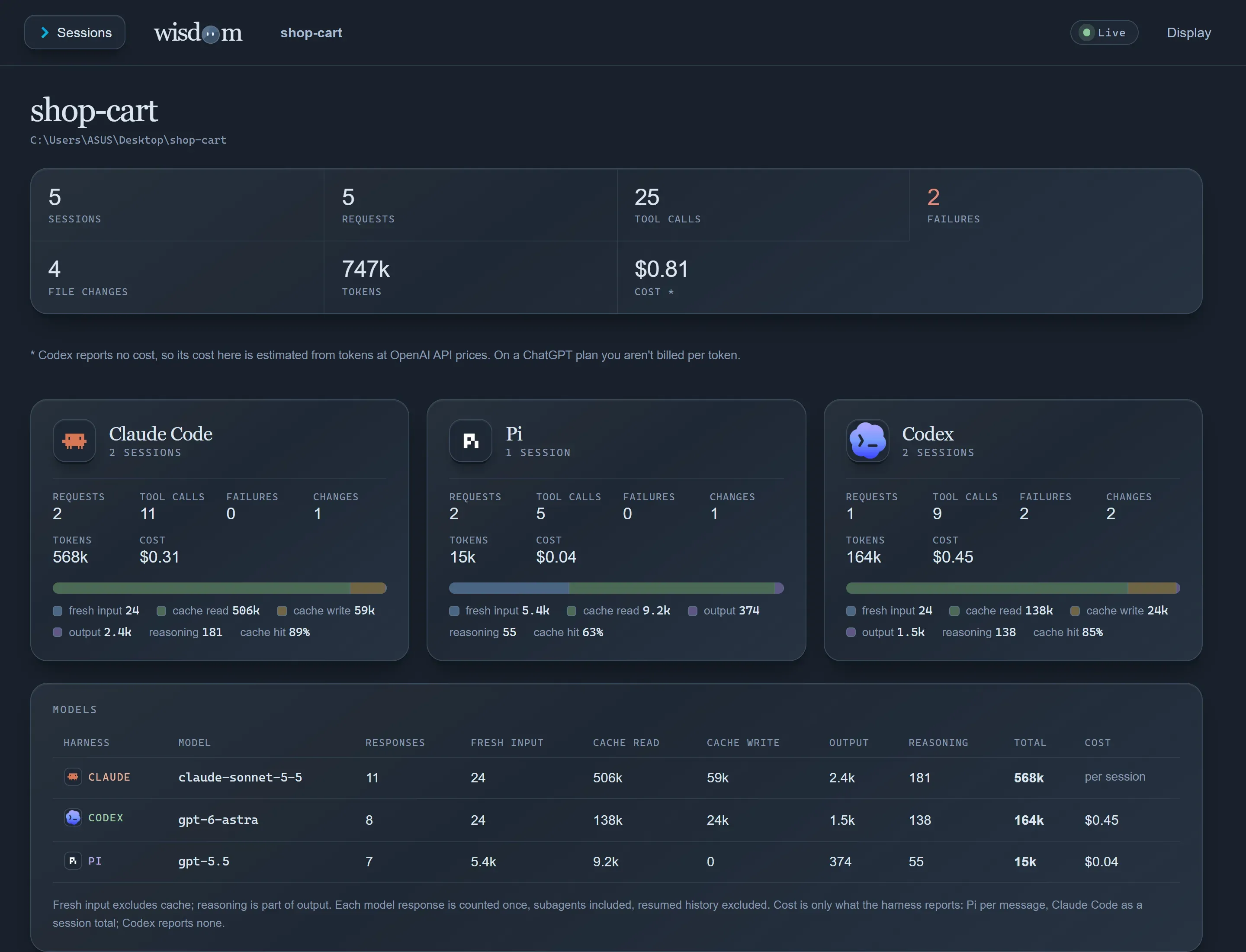
It prints an address, `http://127.0.0.1:7435` by default. Open it in your browser to see the session update while your agent works.
5. ### Ask your agent about it
[Section titled “Ask your agent about it”](#ask-your-agent-about-it)
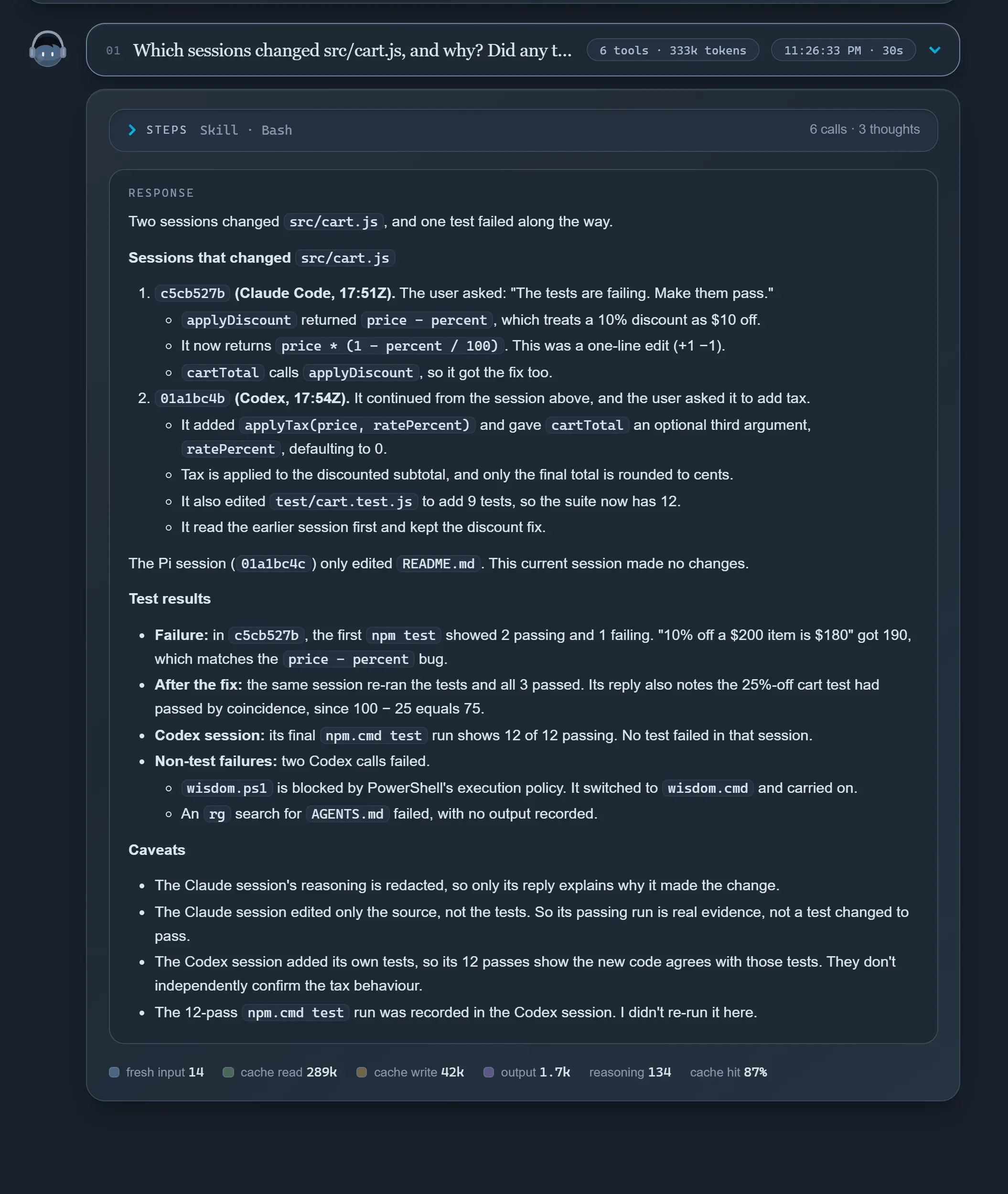
The reading skill from step 1 lets any connected agent read past sessions, including ones recorded from a different agent. Try:
Prompt
```txt
Read the last Wisdom session. What did it change, and did the tests pass?
```
Need a separate login per project?
`wisdom init` and `wisdom track claude` give each agent its own home inside `.wisdom/`. This also records sessions started from a subfolder. See [Record sessions](../../guides/record-sessions/).
## Next steps
[Section titled “Next steps”](#next-steps)
[Read a session](../../guides/read-a-session/)Positions like t3/c2, and what each label means.
[Read a commit](../../guides/read-a-commit/)See which step made each part of a commit.
[Hand off work](../../guides/hand-off-work/)Continue in another agent that reads this session first.
[Share a session](../../guides/share-a-session/)Send one to a teammate, after a secret check.
# Let agents read sessions
> The skill every connected agent gets, what to ask it, and the optional MCP tool.
Your agents read sessions the way you do: `glance`, then `open`. Any agent can read any session, so Codex can read what Claude Code did, and the other way round.
## The skill
[Section titled “The skill”](#the-skill)
`wisdom connect` and `wisdom init` give each agent a skill that teaches it to run these in its shell:
Terminal
```sh
wisdom glance # recorded sessions, newest first
wisdom glance latest # one session: its shape and every turn
wisdom open t3 --capture latest # turn 3, whole
```
Running `connect` or `init` again updates the skill to match your Wisdom version. `wisdom doctor` tells you if it’s missing or old.
## What to ask
[Section titled “What to ask”](#what-to-ask)
Ask in plain words. The agent finds the session and the turn on its own.
* *Which session changed `src/totals.ts`, and was that on purpose?*
* *Read the last Wisdom session. Did the tests pass before it said they did?*
* *What did the Claude Code session try before it settled on this fix?*
* *Which session wrote the last commit, and did it do what I asked?*
For the last one, the skill uses [`wisdom glance --commit`](../read-a-commit/). It also tells your agents not to run `wisdom guide` unless you ask, since that calls a model on your account.
Here an agent checks a change against the request behind it:
Output
```txt
t3 in Add a one-line docstring to main() in jev_router/tool.py.
c4 Edit src/optim_jev/tools/jev_router/tool.py · ok · → p1
reply I added a one-line docstring to main().
p1 src/optim_jev/tools/jev_router/tool.py · modify · +2 −1 · observed during c4
def main() -> None:
- mode = sys.argv[1] if len(sys.argv) > 1 else ""
+ """Dispatch a JSON request from stdin to the handler named by argv[1]."""
+ mode =sys.argv[1] if len(sys.argv) > 1 else ""
```
The request and the reply both say “docstring”, but the diff shows the line below changed too. The agent sees the change, the request behind it, and where they differ.
Inside a recorded session, latest can be the agent itself
The newest session is often the one the agent is running in. To read an earlier one, it runs `wisdom glance` and names the session’s ID. The skill teaches this.
## The MCP tool (optional)
[Section titled “The MCP tool (optional)”](#the-mcp-tool-optional)
Most agents don’t need it. It’s for an agent without a shell, or if you’d rather give a tool than a command. One read-only tool, `ledger`, returns the same text as the CLI. It can’t start an agent or edit code. `wisdom track` already passes it to Claude Code and Codex.
To add it to another agent:
* macOS / Linux
MCP settings
```json
{
"mcpServers": {
"wisdom": {
"command": "wisdom",
"args": ["mcp", "--data", "/path/to/your-project/.wisdom"]
}
}
}
```
* Windows
MCP settings
```json
{
"mcpServers": {
"wisdom": {
"command": "cmd",
"args": ["/c", "wisdom", "mcp", "--data", "C:/path/to/your-project/.wisdom"]
}
}
}
```
# Dashboard
> The local web viewer for a project's sessions, live while your agent works.
Use the dashboard to browse a project’s sessions in your browser, live while your agent works. It starts with the background service and listens only on your own machine. Your agents read the same sessions through their skill instead.
Terminal
```sh
wisdom dashboard # prints the address, http://127.0.0.1:7435 by default
```
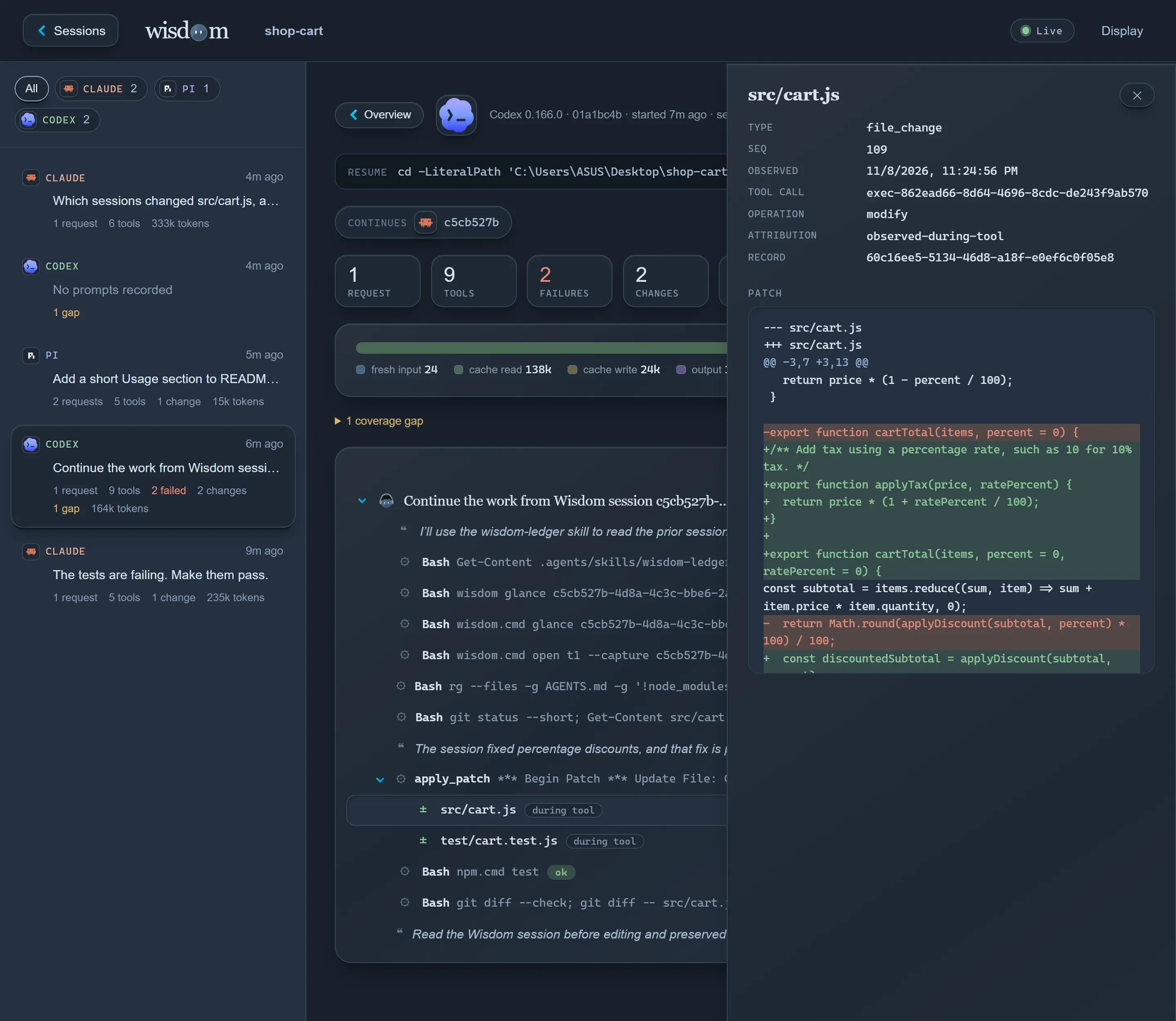
* Overview
Every session across Claude Code, Codex and Pi, with tool usage, the most-changed files, tokens, and disk space.

* Chat view
A session as a conversation: one box per request, with its steps folded (thinking, each tool call, each change) and the response rendered as Markdown.
* Dev view
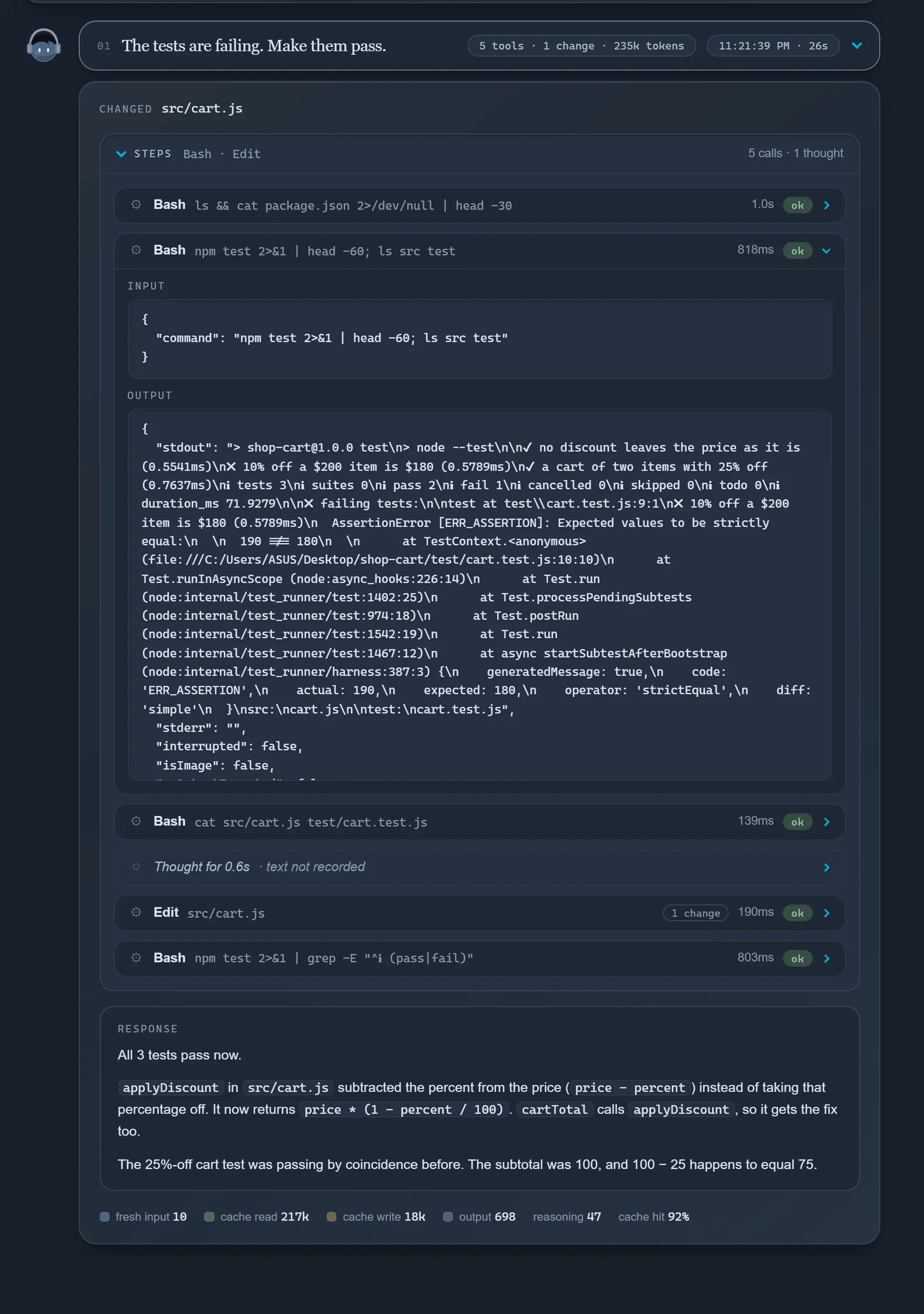
The record as a tree: request → tool calls → file changes, with subagents under the call that started them. Select any node to inspect its input, output or diff.
## Also in the dashboard
[Section titled “Also in the dashboard”](#also-in-the-dashboard)
| Feature | What it does |
| ------------------ | ------------------------------------------------------------------------------------------------------------------------------------------------------------------------------- |
| Tokens and cost | Usage per agent, model, session and request. Cost is what the agent reports. Codex reports none, so it’s estimated at OpenAI’s standard API prices and labelled as an estimate. |
| Continue a session | A command to copy that resumes the session, still recording. |
| Health | The same checks as `wisdom doctor`, at the top of every page. See [Keep it healthy](../keep-it-healthy/). |
| Storage | Space per session, and deleting old ones. |
| Display | Light, Dark and Night themes and a text size, remembered per browser. |
The dashboard never affects recording. If it can’t start, capture carries on and `wisdom doctor` says why. To run the service without it: `wisdom daemon start --no-dashboard`.
# Hand off work
> Carry work on in another agent, the same session, or a copy of it.
An agent runs out of context, or you want a different one to finish the job. Wisdom gives you three ways to carry the work on:
| You want to… | Use | What you get |
| -------------------------------- | ---------------- | ------------------------------------------------------------- |
| Continue in **another agent** | `wisdom handoff` | A new session that reads the old one first |
| Continue **the same session** | `wisdom resume` | The same session, still recording |
| Continue **a copy** of a session | `wisdom clone` | A new session of the same agent, holding the old conversation |
## Handoff
[Section titled “Handoff”](#handoff)
Terminal
```sh
wisdom handoff codex
```
This starts a new Codex session whose first prompt names the last session from another agent and tells Codex to read it with `glance` and `open` before changing anything.
**Claude Code session**recorded by Wisdom
**wisdom handoff codex**first prompt names the session
**Codex reads it**`glance`, then `open` the turns it needs
**Codex continues**linked to the session it read
Nothing is summarized or pasted in. The new agent reads the record itself, as much as it needs.
Terminal
```sh
# name the session to read (full ID)
wisdom handoff pi --from 0f3c8a1e-…
# add your own words to the first prompt
wisdom handoff codex -- also run the tests
# an existing session reads another one
wisdom handoff 0f3c8a1e-… --from 01a1aca0-…
```
Both sessions show the link. A glance of the new one says `continues ()`; an existing one says `continued after ()`.
Note
A session that’s still running can’t take outside input. Handing off into one prints the prompt for you to paste instead.
## Resume
[Section titled “Resume”](#resume)
Terminal
```sh
wisdom resume 0f3c8a1e-77b2-4c10-9a5e-2d81c6f04b3a
```
Continues a session in its own agent and folder, still recording. It takes the **full** ID, so it can never land in the wrong session; `wisdom glance` prints the exact command as `resume with:`. The time in between is marked as a gap, because file changes then weren’t observed.
## Clone
[Section titled “Clone”](#clone)
Terminal
```sh
wisdom clone 0f3c8a1e
```
A clone is a **new** session of the same agent that already holds the other session’s conversation, so the agent carries on as if it had done that work. The original is never changed. The source can be one of your sessions, or one a teammate [shared with you](../share-a-session/).
* Only prompts after the clone count as its turns. The copied ones stay readable in the original.
* The clone compares the files the session changed with your disk, and names any that differ.
* The whole history goes to your model with the first prompt, and that usage counts.
* Same agent only. To move to another agent, use `handoff`.
# Keep it healthy
> Check, repair, run the background service, and clean up old sessions.
Wisdom mostly runs on its own. When a session isn’t recorded, or after you move Wisdom or change Node versions, start here.
## Check
[Section titled “Check”](#check)
Terminal
```sh
wisdom doctor
```
Checks the background service, the dashboard, each agent’s hooks and version, Codex hook trust, and events waiting to be recorded. It changes nothing and prints the fix for each problem.
| Level | Meaning |
| --------- | --------------------------------------------------------------------------------------------------------------- |
| `ok` | Working. |
| `note` | Worth knowing: the service is stopped (it starts by itself), or an agent is newer than the last tested version. |
| `problem` | Recording or reading is affected until you run the fix. |
The same checks run at the top of every dashboard page.
## Repair
[Section titled “Repair”](#repair)
Hooks store the full path of the installed Wisdom. They break when that path changes: you moved the install, or switched Node versions with nvm. Your agent keeps working either way; only live recording stops.
Terminal
```sh
wisdom connect # a connected project
wisdom init # a tracked project
```
Both are safe to run again. In the dashboard, **Repair…** does the same and backs up every file it changes first, so you can restore it. Codex asks you to approve changed hooks again in `/hooks`.
## The background service
[Section titled “The background service”](#the-background-service)
It starts by itself when a hook or command needs it, and keeps running after your agent exits.
Terminal
```sh
wisdom daemon status
wisdom daemon stop # the next hook starts it again
wisdom daemon start
```
It listens on `127.0.0.1:7434`, and the dashboard on the next port. If another project already uses them, it takes the next free pair. Each project has its own service.
## Storage and delete
[Section titled “Storage and delete”](#storage-and-delete)
The dashboard’s overview shows how much space each session takes. **Clean up…** lists sessions not active for 30 days (change the number), and each session page has **Delete**.
Nothing is deleted until you’ve read what goes and confirmed: the session’s record, its evidence, and its files in the project’s agent home. For a connected session, a checkbox (off by default) also deletes the agent’s own copy in your home folder; then the agent can no longer resume it.
Caution
Deleting can’t be undone, and Wisdom never deletes on a schedule. A session still recording can’t be deleted until it ends.
## Commit guides
[Section titled “Commit guides”](#commit-guides)
Each commit’s record and guide are made by a background job after the commit. It writes one line to `.wisdom/jobs.log` when it ends:
.wisdom/jobs.log
```txt
2026-11-11T09:41:02.118Z a4c91e2b7f30 job · record kept · guide by claude-haiku-5-5 via Claude Code, reading the sessions' windows, check passed, writer 38.4 s, $0.0031 · 40 s
```
A job that died is started again, up to three times; after that your next `git push` or `wisdom guide ` finishes it. When that’s more than two minutes after the commit, the record says `record kept later`.
| You see | What to do |
| ---------------------------------------------------------------------------------------------------------- | ------------------------------------------------------------------------------------------------------------------------------ |
| `guide · none: no guide writer: Claude Code is not installed and wisdom-team.json names no guides.command` | Install and log in to Claude Code, or use `wisdom guide off` for the plain guide. |
| `guide · none: the guide writer failed: …` | The writer’s own error follows. `wisdom guide ` tries again. |
| `No guide written: the guide must read session …, which is no longer recorded here` | That session was deleted, so a model guide can’t be written. Outside team mode, `glance --commit` still shows the plain guide. |
## Move or back up a project
[Section titled “Move or back up a project”](#move-or-back-up-a-project)
Stop the service first (`wisdom daemon stop`), then move or copy the whole folder. Recording carries on in the new place. For a backup, copy all of `.wisdom/`, and treat the copy like a password: it holds your sessions unredacted, and in a tracked project, your agents’ logins.
# Read a commit
> Start from a git commit and see which recorded step made each part of it, with a short guide for reviewers.
New in 0.6.0, in beta
Install it with `npm install -g @oqura/wisdom@beta`. Until 0.6.0 is the default, `npm install -g @oqura/wisdom` gives you 0.5.1, which doesn’t have these commands.
[Read a session](../read-a-session/) starts from a session. This page goes the other way: start from a commit, and see which recorded step wrote each part of it.
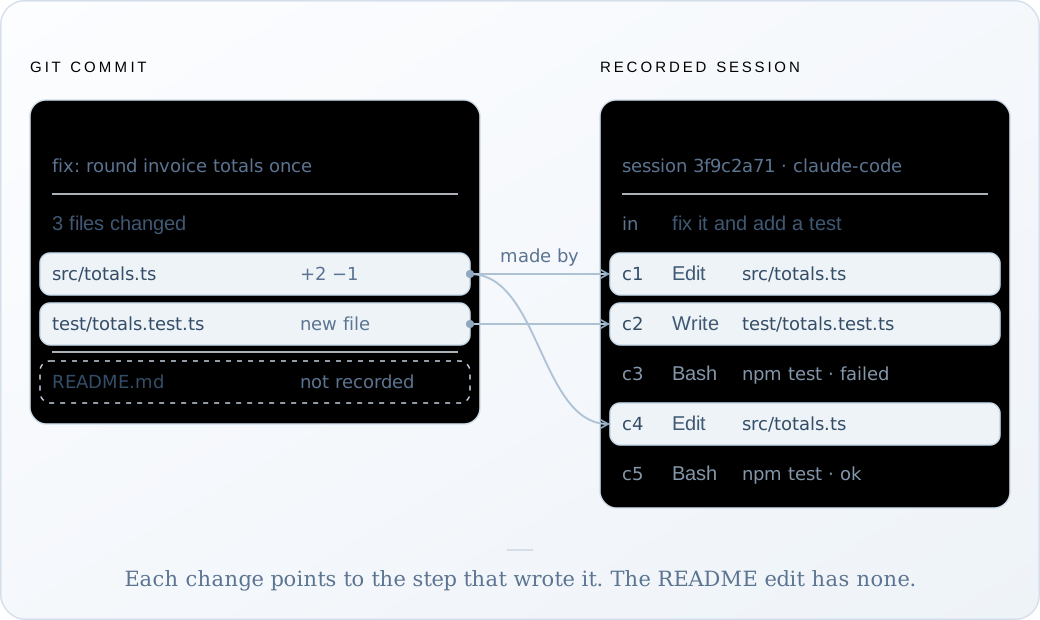
Try it on your last commit:
Terminal
```sh
wisdom glance --commit HEAD # or a hash, or a branch
wisdom open t2/c1 --capture 3f9c2a71 # read a step it names
```
There’s nothing to set up. A commit your agent makes, or one you make from its work, is read the same way.
## From a line of code
[Section titled “From a line of code”](#from-a-line-of-code)
Find the commit the way you always do, then follow it into the session:
Terminal
```sh
git blame -L 9,10 src/totals.ts # the commit that wrote these lines: a4c91e2
wisdom glance --commit a4c91e2 # the steps that made them: t2/c1, t2/c4 in 3f9c2a71
wisdom open t2 --capture 3f9c2a71 # the request, the failing test, the fix
```
Three commands take you from a line in your editor to what was asked, what the agent ran, and what failed before it got there.
## An example
[Section titled “An example”](#an-example)
Here the agent from the [home page](/wisdom-docs/) fixed a rounding bug in t2 and committed it in t3. You also edited the README while nothing was recording.
\~/invoice-api
```txt
❯ wisdom glance --commit HEAD
commit a4c91e2b7f30 · fix: round invoice totals once · committed 2026-11-11 09:40Z · version 412
parent 7d2e9b1c04aa · 3 files · 3 pieces: 2 from recorded steps, 1 not recorded
record kept when the commit was made, 2026-11-11 09:40Z
the commit's own diff: git show a4c91e2b7f30
README.md · modify · +1 −0 · not recorded
src/totals.ts · modify · +2 −1
@@ -9,1 +9,2 @@ t2/c1, t2/c4 in session 3f9c2a71
test/totals.test.ts · create · +14 −0
@@ -0,0 +1,14 @@ t2/c2 in session 3f9c2a71
sessions
3f9c2a71-8d4e-4b1a-9c55-2e7f0b6d1a90 claude-code t2/c1, t2/c2, t2/c4 · window t1–t3
window: from the start of these sessions (no earlier commit of yours on this branch), up to this commit
To read a step, open its position in its session, such as {"capture":"3f9c2a71","open":"t2/c1"}.
guide · plain, built from the record now, no model · derived, not evidence · not stored; a model guide on request: wisdom guide a4c91e2b7f30
## Summary
fix: round invoice totals once. Written by Wisdom from the commit's record, without a model: which recorded step made each piece and what was asked in that turn. It does not say why beyond those requests.
## Items
- README.md (modify) · not recorded
No recording explains this change.
- src/totals.ts @@ -9,1 +9,2 @@ · t2/c1, t2/c4 in session 3f9c2a71
Made by [t2/c1 3f9c2a71] (claude-code). Asked in t2: "fix it and add a test". Made by [t2/c4 3f9c2a71] (claude-code).
- test/totals.test.ts @@ -0,0 +1,14 @@ · t2/c2 in session 3f9c2a71
Made by [t2/c2 3f9c2a71] (claude-code). Asked in t2: "fix it and add a test".
complete · 28 lines
```
A **piece** is one hunk of the commit’s diff against its parent, and its `@@` header matches `git show`. Each piece names the steps that made it. Open one with `wisdom open` to see the call, its input and output, and the turn it ran in.
## How a session is linked
[Section titled “How a session is linked”](#how-a-session-is-linked)
Every recorded file change keeps a hash of the whole file before and after it. Wisdom starts from the file as committed and follows those hashes back, change by change, to the file in the parent commit. Then it traces each line through the recorded diffs.
So a session is linked only because it produced these exact bytes, never because it touched a file with the same name. When two sessions saw the same edit and the record can’t tell which made it, the piece lists both rather than guess.
## Reading the labels
[Section titled “Reading the labels”](#reading-the-labels)
| Label | What it means |
| ------------------------------------- | ------------------------------------------------------------------------------------------------------------------------ |
| `t2/c1 in session 3f9c2a71` | The step that wrote these lines or removed them. |
| `(changed outside any recorded step)` | A session saw the change while no tool was running: you, your editor, a formatter. `outside` when it fell between turns. |
| `not recorded` | Nothing recorded explains it: made before recording, while nothing was recording, or in a session that’s gone. |
| `2 lines not recorded` | Part of the piece is explained, part isn’t. |
| `whole file from …` | Lines couldn’t be matched (a binary file, a missing diff), so the steps that produced the file are listed. |
| `lined up by file, not by line` | The steps explain the file, but git lines this hunk up differently, for example around repeated lines. |
| `excluded from recording` | The path is excluded, such as `node_modules` or anything in `.wisdomignore`. |
| `(changed since the commit)` | The session no longer holds that exact change. |
| `(session not available)` | The session isn’t here: deleted, or a teammate’s you haven’t fetched. |
Every label is in the [vocabulary](../../reference/vocabulary/#commits).
## When Wisdom keeps a record
[Section titled “When Wisdom keeps a record”](#when-wisdom-keeps-a-record)
While the background service runs, it notices each commit you make in this clone, including ones your agent makes with your git identity, and keeps the answer as a **record**. The link then outlives the sessions it points to. It doesn’t keep one for merges, or for commits that arrive by pull or checkout.
A commit with no record is worked out when you ask, from the recordings that are still here. The output then says `worked out now from the recordings`, and has no guide.
Records live in your own `.git`, as `refs/wisdom/records/`. They’re never on a branch, and a normal `git push` doesn’t send them.
Caution
`git push --mirror` sends every ref, so it sends your commit records and guides too.
## Guides
[Section titled “Guides”](#guides)
A **guide** is a short account of a commit for whoever reviews it, citing the steps behind each piece. Read it as a summary, not as evidence: Wisdom checks that it covers every piece and that each citation exists, but not that it’s right. Only commits with agent work get one.
| Guide | How you get it | Model |
| ------------------------ | ---------------------------------------------------------------------------------------------------------- | ------------------------------------------ |
| Plain | Shown by `glance --commit` for any kept record with agent work. Built each time you read it, never stored. | None |
| Model, on request | `wisdom guide ` writes one now and keeps it in the commit’s record. | Claude Haiku 5.5, through your Claude Code |
| Model, after each commit | `wisdom guide on`. `wisdom guide off` turns it back off. | The same |
The plain guide names each piece’s step and quotes what was asked in that turn. It says nothing about why beyond those requests.
A model guide reads the commit’s sessions from your previous commit on this branch up to this one, because the reason for a change often sits in an earlier turn. Besides a paragraph per piece, it has a short **Beyond the edits** section: where the agent didn’t do what was asked, reasons given in other turns, and the tests it ran and what they reported.
After `wisdom guide a4c91e2`, the end of `glance --commit` shows the model’s guide instead of the plain one. An example, for the commit above:
Output
```txt
guide · written by claude-haiku-5-5 via Claude Code, reading the sessions' windows, 2026-11-11 09:42Z · derived, not evidence · Wisdom checked that it covers every item and that its citations exist, not that it is right
## Summary
Invoice totals are now rounded once, after the sum, instead of per line, with a test for a long invoice.
## Items
- README.md (modify) · not recorded
The README gained one line. No recording explains this change.
- src/totals.ts @@ -9,1 +9,2 @@ · t2/c1, t2/c4 in session 3f9c2a71
The total is summed first and rounded once [t2/c1 3f9c2a71], because rounding each line made cents drift on long invoices [t1 3f9c2a71]. A second edit followed a failing test [t2/c4 3f9c2a71].
- test/totals.test.ts @@ -0,0 +1,14 @@ · t2/c2 in session 3f9c2a71
A new test checks a 40-line invoice [t2/c2 3f9c2a71].
## Beyond the edits
Departed from the request: none found in the window.
Reasons from other turns: t1 found that each line item was rounded before the sum [t1 3f9c2a71].
Tests run: npm test -- totals failed, expected 1204.37 and received 1204.35 [t2/c3 3f9c2a71], then passed after the second edit [t2/c5 3f9c2a71].
```
The citations are positions you can open, so a reviewer can check each sentence against the recording.
* **Cost.** In Wisdom’s own tests a guide cost $0.0013 to $0.0081 at API prices. On a subscription, it comes from your plan.
* **What it sends.** The session text it reads goes to the model’s provider through your Claude Code login, as in any Claude Code session.
* **Its sessions must be here.** If a session the commit names was deleted, `wisdom guide` says so and writes nothing.
`wisdom guide on` adds one git hook, `post-commit`, in `.git/hooks`. It doesn’t change your commit messages and never pushes anything. If your repository tracks its hooks folder (Husky’s `.husky/`), Wisdom doesn’t write there and prints the line to add instead.
For your agents
The reading skill teaches your agents `glance --commit` too. It also tells them not to run `wisdom guide` unless you ask, since it calls a model on your account.
# Read a session
> See a session at a glance, open the turn that matters, and read its labels.
Reading a session takes two moves: **glance** to see its shape, then **open** the part that matters. Your agents use the same two moves, through their skill.
Terminal
```sh
wisdom glance # every recorded session, newest first
wisdom glance latest # one session: its shape and every turn
wisdom open t2 --capture latest # turn 2, whole
```
Name a session by its full ID, by its first 8 or more characters, or as `latest` (the newest session with a turn). Every command finds `.wisdom/` from the folder you’re in, like git finds `.git`.
To start from a commit instead, see [Read a commit](../read-a-commit/).
## Positions
[Section titled “Positions”](#positions)
Everything in a session has a short address. A glance shows them; `open` takes them.
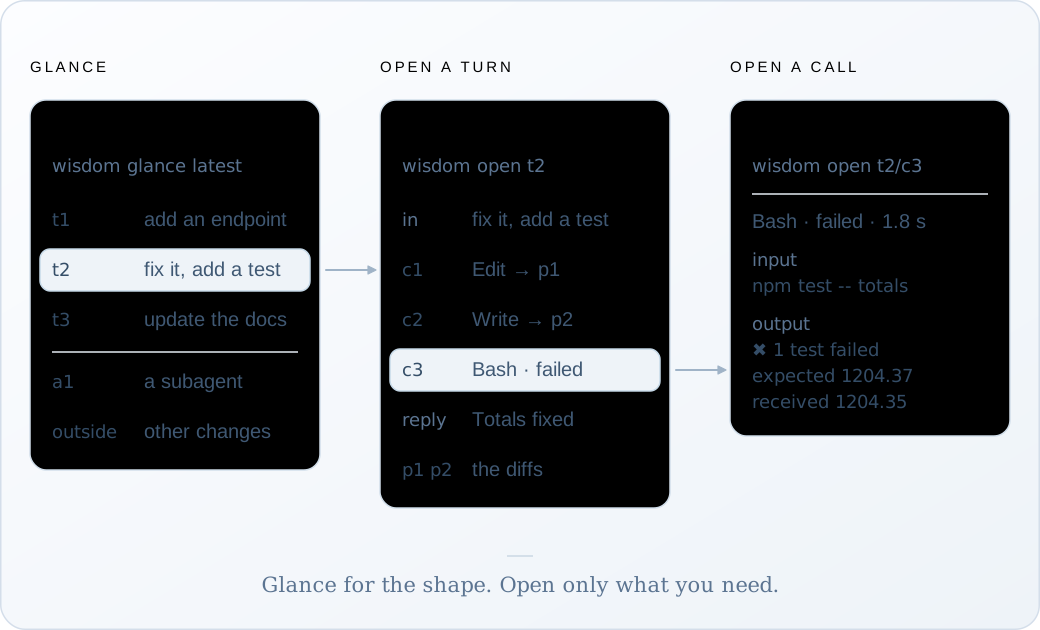
| Position | What it opens |
| --------- | ------------------------------------------------------------------------ |
| `t3` | Turn 3: your third prompt and everything the agent did until it answered |
| `t3/c2` | The second tool call of turn 3, its full input and output |
| `a1` | The first subagent, laid out like a turn |
| `a1/c2` | A tool call of that subagent |
| `outside` | Calls and file changes outside any turn |
`p1`, `p2`… label the file changes inside a turn. They aren’t addresses: open the turn or the call to see them.
## Opening a turn
[Section titled “Opening a turn”](#opening-a-turn)
A turn comes back in recorded order: thinking, each call with its result, the reply, and then all the turn’s file changes together, as diffs. An example:
\~/invoice-api
```ansi
❯ wisdom open t2 --capture latest
t2 · session 3f9c2a71 · version 412 · 168,204 tokens
in fix it and add a test
thinking redacted · 2.1 s (it happened; its text was not recorded)
c1 Edit src/totals.ts · ok · 12 ms · → p1
input and output repeat p1 · open t2/c1 to read them
c2 Write test/totals.test.ts · ok · 9 ms · → p2
input and output repeat p2 · open t2/c2 to read them
c3 Bash · failed · 1.8 s
input {"command":"npm test -- totals"}
output
✖ rounds a 40-line invoice once (2.1 ms)
expected 1204.37, received 1204.35
c4 Edit src/totals.ts · ok · 10 ms · → p3
input and output repeat p3 · open t2/c4 to read them
c5 Bash · ok · 1.6 s
input {"command":"npm test -- totals"}
output
✔ rounds a 40-line invoice once (1.9 ms)
reply Totals now round once, after the sum. A new test covers a 40-line invoice.
p1 src/totals.ts · modify · +2 −2 · observed during c1
--- src/totals.ts
+++ src/totals.ts
@@ -8,6 +8,6 @@
export function invoiceTotal(lines: Line[]): number {
- return lines.reduce((sum, l) => sum + round(l.qty * l.price), 0);
+ const raw = lines.reduce((sum, l) => sum + l.qty * l.price, 0);
+ return round(raw);
}
complete · 29 lines
```
Each piece of evidence is shown once. An edit’s input *is* its diff, so the call points to `p1` instead of repeating it. A file the agent read is listed by size; open the call to read it.
## In a terminal, or piped
[Section titled “In a terminal, or piped”](#in-a-terminal-or-piped)
In a terminal, `glance` and `open` are coloured and fitted to its width. A long prompt or tool output is folded, and the fold names the command that shows it whole. No word is changed.
Piped to a file or another program, or with `--plain`, you get the exact text your agents read: uncoloured and unfolded.
Terminal
```sh
wisdom open t2 --capture latest --plain > turn.txt
```
## Reading the labels
[Section titled “Reading the labels”](#reading-the-labels)
These labels say how much the record can tell you:
| Label | What it means |
| --------------------- | ------------------------------------------------------------------------------------------ |
| `observed during c1` | The file changed while that call ran. Timing, not proof the call made it. |
| `external-or-unknown` | The file changed while no tool was running: you, your editor, another process. |
| `thinking redacted` | The agent thought, but its text wasn’t recorded (Claude Code omits it; Codex encrypts it). |
| `not recorded` | A gap in the recording, with the reason. |
| `no result recorded` | The call never reported back. Not the same as success. |
| `ok` | The tool reported success. Not proof the code is right. |
Long answers
One answer holds at most 80,000 characters. A longer one ends with `limited · lines 1–1,950 of 41,230 · continue: {…}` and the exact way to get the rest: add `--from` and `--at` as shown. `--at` pins the version, so a session that’s still recording can’t change under you while you read.
# Record sessions
> Two ways to record Claude Code, Codex and Pi, and what happens when things go wrong.
Wisdom records an agent through the agent’s own hooks. There are two ways to put them in place. Most people only need the first.
| | **Connect** | **Track** |
| --------------------- | ------------------------------------------------- | -------------------------------------------------------------------- |
| Start your agent with | `claude`, `codex`, `pi`, as usual | `wisdom track claude` (or `codex`, `pi`) |
| Login | Your normal one | One per project, kept in `.wisdom/` |
| Hooks live in | The project’s own agent settings, kept out of git | The agent’s home inside `.wisdom/` |
| Records | Agents started in the project’s top folder | Every process using that home, from any folder |
| Best for | Everyday work | Subfolders, Codex in a git worktree, keeping everything in one place |
## Connect: your normal login
[Section titled “Connect: your normal login”](#connect-your-normal-login)
Terminal
```sh
cd your-project
wisdom connect
```
Wisdom adds its hook and reading skill to the project’s own settings for each agent:
| Agent | Settings | Skill |
| ----------- | ----------------------------- | ----------------- |
| Claude Code | `.claude/settings.local.json` | `.claude/skills/` |
| Codex | `.codex/hooks.json` | `.agents/skills/` |
| Pi | `.pi/settings.json` | `.agents/skills/` |
These paths go in `.git/info/exclude`, your clone’s own ignore file, so nothing reaches git. Wisdom only adds its own entries and leaves the rest of each file alone. Running `wisdom connect` again repairs them.
Each agent has its own rule for loading project settings:
* Claude Code
Start `claude` in the project’s **top folder**. Started in a subfolder, it doesn’t load the project’s settings, and that session isn’t recorded.
* Codex
Trust the project when Codex asks, then approve Wisdom’s hooks once in `/hooks`. Codex records from any folder in the project, but **not inside a git worktree**, where it ignores project hooks.
* Pi
Start `pi` in the project’s **top folder**, and trust the project when it asks.
To stop recording, run `wisdom disconnect`. It removes exactly what `connect` added. Your recordings are kept.
## Track: a home of its own
[Section titled “Track: a home of its own”](#track-a-home-of-its-own)
Terminal
```sh
wisdom init
```
`init` creates `.wisdom/` and gives each agent a home inside it, with Wisdom’s hooks already in place. Any process that uses that home is recorded, however it was started: a resume, a background `/fork`, a worktree. Then start an agent with `track`. Each one asks you to log in once per project.
* Claude Code
Terminal
```sh
wisdom track claude
wisdom track claude -- --continue # options after -- go to claude
```
* Codex
Codex runs a hook only after you review it. Do that once:
Terminal
```sh
wisdom track codex --setup-hooks # open /hooks, trust Wisdom's hooks, quit
wisdom track codex
```
* Pi
Terminal
```sh
wisdom track pi # run /login once inside Pi
```
Your global `~/.claude`, `~/.codex` and `~/.pi/agent` are never touched. Settings, plugins and MCP servers there don’t apply inside a tracked home.
Both in one project
You can connect and track the same project. A tracked session is recorded once, by its own home’s hook; the project’s copy stands aside.
## When something goes wrong
[Section titled “When something goes wrong”](#when-something-goes-wrong)
| Situation | What Wisdom does |
| ---------------------------------------------------------- | ----------------------------------------------------------------------------------------------------------------------------------------------------------------------------------------- |
| The background service is down | The hook keeps the event in `.wisdom/spool/`, starts the service and shows a warning. Kept events are recorded later, marked `delivered-late`. File changes in that time aren’t observed. |
| You resume a session | The same record continues. The time in between is marked `not-recording-between-visits`. |
| Hooks never ran (Codex hooks not yet trusted, for example) | Once the agent’s own session file has been quiet for two minutes, Wisdom reads it. Prompts show as `in (from session file)`, and the session is marked `not-recorded-live`. |
| The session goes quiet | After 10 minutes with no event and no running tool, the record closes as `idle`. The next event continues it. |
| `connect` says an agent is “not connected: git tracks …” | The project commits that agent’s settings file, and Wisdom won’t write your machine’s paths into a file your teammates share. Record that agent with `wisdom track` instead. |
## Leaving files out
[Section titled “Leaving files out”](#leaving-files-out)
To stop Wisdom diffing some files, add a `.wisdomignore` to the project: one relative path or folder per line, `#` for comments. There are no globs. `.git`, `node_modules`, `dist`, `build` and similar folders are skipped already.
.wisdomignore
```txt
# generated
src/generated/
fixtures/large-dump.json
```
# Share a session
> Send a session to a teammate, read one you received, or export one as Markdown.
Recordings never leave your machine on their own. These commands send one session by hand, and each one checks for secrets first. To share with every push instead, see [Share with your team](../share-with-your-team/).
**wisdom share**secret check, then one file
**You send it**chat, email, a drive
**wisdom import**on your teammate's machine
**Read-only copy**`glance`, `open`, clone or hand off
## Share
[Section titled “Share”](#share)
Terminal
```sh
wisdom share 0f3c8a1e
wisdom share 0f3c8a1e 01a1aca0 --out a.wisdom-share
```
This writes one file with the sessions’ records, diffs and transcript copies. It never holds logins. By default it goes to `.wisdom/shared-out/`, which git ignores.
## The secret check
[Section titled “The secret check”](#the-secret-check)
Before writing anything, Wisdom lists every value that looks like a secret (API keys, tokens, private keys, `PASSWORD=` and similar) or a personal detail such as an email address, masked, with where it appears:
Output
```txt
Found 2 possible secrets:
1 openai-key sk-pro…3456 t1 · Bash output (and 2 other places)
2 secret-assignment hu… t1 · patch of notes.txt
Redact all and share? [r] redact all [c] choose one by one [k] keep all [x] cancel:
```
| Choice | Effect |
| ------ | -------------------------------------------------------------------------------------------------------- |
| Redact | Replaces the value with `[redacted by sender: ]` in the file. Your own recording is never changed. |
| Keep | Sends it as it is, for example a fake key a test depends on. |
| Cancel | Writes nothing. So does any answer it doesn’t understand. |
In a script, pass `--redact` or `--keep-secrets`. Without either, nothing is written.
Caution
The check finds the shapes it knows and will miss others. Look through what you send.
## Import
[Section titled “Import”](#import)
Terminal
```sh
wisdom import 0f3c8a1e-20261106-1402.wisdom-share
```
Or drop the file into `.wisdom/shared/`, and the service imports it within a few seconds. It’s kept as its own read-only copy, never mixed into your recordings, and listed under “shared with you”:
Output
```txt
shared with you · 1, read-only
0f3c8a1e-… claude-code 2026-11-06 10:00Z 3 turns from shop-api, shared 2026-11-06 14:02Z
```
Read it like any session. You can’t resume someone else’s recording, but you can [clone it or hand it off](../hand-off-work/) to carry the work on.
## Export as Markdown
[Section titled “Export as Markdown”](#export-as-markdown)
Terminal
```sh
wisdom export 0f3c8a1e --out session.md
wisdom export 0f3c8a1e --redact --out - # print it, to paste
```
One Markdown document for people without Wisdom: a PR description, an issue. Every prompt and reply is in full, each tool call is a folded block, and each turn’s changes follow as `diff` blocks. GitHub and GitLab open and close the folds. The same secret check runs first.
# Share with your team
> Let teammates read the sessions behind each other's commits, through the git remote you already push to.
New in 0.6.0, in beta
Install it with `npm install -g @oqura/wisdom@beta`. Until 0.6.0 is the default, `npm install -g @oqura/wisdom` gives you 0.5.1, which doesn’t have these commands.
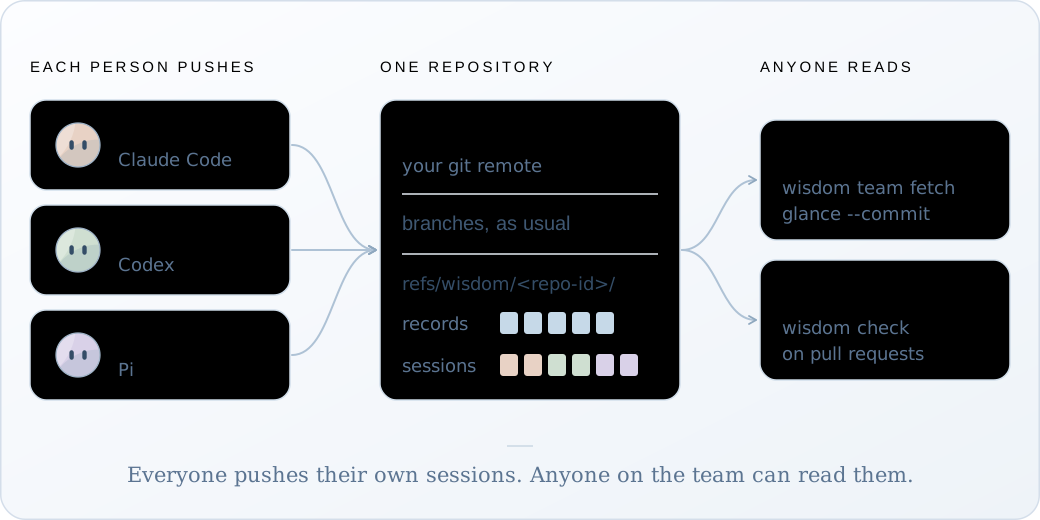
[Share a session](../share-a-session/) sends one file by hand. Team mode does it with every push: each commit’s [record and guide](../read-a-commit/), and the sessions behind it, go to your own git remote as hidden refs. A teammate fetches them and reads your commit the way you do. Nothing goes to Wisdom.
It’s opt-in. A repository is in team mode while it has a committed `wisdom-team.json`; without one, Wisdom changes no commit message and pushes nothing.
## Set it up
[Section titled “Set it up”](#set-it-up)
1. ### Turn it on
[Section titled “Turn it on”](#turn-it-on)
One person adds the file and pushes it:
Terminal
```sh
wisdom team init
git add wisdom-team.json
git commit -m "Turn on Wisdom team mode"
git push
```
2. ### Connect each clone
[Section titled “Connect each clone”](#connect-each-clone)
Everyone, you included, pulls the file and runs `connect` again:
Terminal
```sh
git pull
wisdom connect
```
Now that the file is there, this also installs three git hooks:
Output
```txt
Team mode: Wisdom's git hooks are in /home/maya/invoice-api/.git/hooks. Turn them off with: wisdom team hooks off
```
3. ### Commit and push as usual
[Section titled “Commit and push as usual”](#commit-and-push-as-usual)
Terminal
```sh
git push
```
Output
```txt
Wisdom: 1 commit record and 1 session version(s) sent to origin.
```
4. ### Read a teammate’s commit
[Section titled “Read a teammate’s commit”](#read-a-teammates-commit)
Terminal
```sh
git pull
wisdom team fetch
wisdom glance --commit a4c91e2
```
Output
```txt
1 teammate session updated, 0 removed by the team's deletion list, 3 commit records here.
```
Their sessions are read-only copies here. Open the steps a commit names with `wisdom open t2/c1 --capture `, as with your own.
## What happens on each commit
[Section titled “What happens on each commit”](#what-happens-on-each-commit)
* **The commit.** Wisdom adds one line to the message, `Wisdom-Record: r-…`. It follows the commit through an amend, a rebase and a squash merge, so the record can be found again.
* **After it.** A background job keeps the commit’s record. If the commit has agent work, a model writes its guide: Claude Haiku 5.5 through your own Claude Code, about $0.001 to $0.008 a guide in Wisdom’s tests. The commit doesn’t wait for it.
* **The push.** Your `git push` waits for any guide still being written, up to five minutes, then sends the sessions and then the records. If any of this fails, Wisdom says so and your push goes ahead.
Only commits made in team mode travel. Work you recorded before `wisdom-team.json` was committed stays on your machine.
To send without a `git push`, run `wisdom team push`.
## What a push sends
[Section titled “What a push sends”](#what-a-push-sends)
| Sent | Never sent |
| --------------------------------------------------------------------------------------------------------------------------- | ------------------------------- |
| The sessions a pushed commit’s record names | Sessions no pushed commit names |
| Each commit’s record and guide | Your `.wisdom/` folder |
| Your git name and email, labelled “git config”, since git doesn’t verify them. Set `identity` to `false` to leave them out. | Any login |
Each session goes through the same export as `wisdom share`, and every possible secret is redacted automatically, since there’s no one to ask during a push. The records are scanned the same way, since a guide can quote a request. Your own recording is never changed.
Caution
The check finds the shapes it knows and will miss others. Anyone who can read the repository can fetch what’s pushed. To add your own scanner, set `check` in [`wisdom-team.json`](../../reference/files-and-config/#wisdom-teamjson).
## Turn off the model
[Section titled “Turn off the model”](#turn-off-the-model)
Terminal
```sh
wisdom guide off
```
Your commits then get a plain guide that Wisdom writes from the record: each piece’s step and what was asked in that turn. It costs nothing, but says nothing about why beyond those requests. `wisdom guide on` turns the model back on. It only changes your own clone.
To use another writer for the whole team (Codex, an API key, a local model), set `guides` in [`wisdom-team.json`](../../reference/files-and-config/#wisdom-teamjson).
## Check pull requests in CI
[Section titled “Check pull requests in CI”](#check-pull-requests-in-ci)
`wisdom check` needs no recordings, only the repository. For GitHub Actions:
.github/workflows/wisdom.yml
```yaml
name: wisdom
on: pull_request
jobs:
guides:
runs-on: ubuntu-latest
steps:
- uses: actions/checkout@v4
with: { fetch-depth: 0 }
- uses: actions/setup-node@v4
with: { node-version: 24 }
- run: npm install -g @oqura/wisdom@beta # @beta until 0.6.0 is the default
- run: wisdom check --range origin/${{ github.base_ref }}..HEAD
```
It prints one line per commit and fails when a commit with agent work has no guide, has one that didn’t pass Wisdom’s check, or names a session that isn’t on the remote. A commit made without Wisdom isn’t counted against you.
**Squash merges.** GitHub gives the squashed commit a new hash, so it has no record of its own. Its message keeps the `Wisdom-Record:` lines of the commits inside it, and `glance --commit` and the check read those records instead. Keep the lines when you edit a squash message, or set the default squash message to “Pull request title and commit details” (Settings > General > Pull Requests).
## Remove a session
[Section titled “Remove a session”](#remove-a-session)
Terminal
```sh
wisdom team delete 3f9c2a71
```
This removes it from the remote and adds it to the team’s deletion list, so no clone pushes it back. Teammates’ copies go at their next `wisdom team fetch`. Your own recording is kept.
To remove old sessions as a habit, set `retentionDays` in `wisdom-team.json` and run `wisdom team prune`. It keeps any session a pushed commit still names.
Caution
GitHub keeps a deleted session’s data until its own cleanup, so someone who knows its hash can still fetch it. There’s no command to delete a commit record, and one already fetched stays in that clone.
## Limits
[Section titled “Limits”](#limits)
* Tested with GitHub, not yet GitLab.
* A pull request from a fork can’t send sessions: forks can’t push hidden refs.
* The default writer needs Claude Code installed and logged in. Without it, commits with agent work get no guide and say why; `wisdom guide off` gives them the plain one.
* A session is pushed whole, about 100 KB for a typical one. Keep one session per task, so unrelated work doesn’t travel with it.
To leave team mode, remove `wisdom-team.json` and run `wisdom team hooks off` in each clone.
# CLI
> Every command and option of the wisdom CLI.
Every command finds `.wisdom/` from the current folder upward, the way git finds `.git`. On Windows PowerShell with scripts blocked, type `wisdom.cmd`.
`` is a session ID, its first 8 or more characters, or `latest`. `` is `t3` (a turn), `t3/c2` (a tool call), `a1` (a subagent), `a1/c2`, or `outside`.
## Set up a project
[Section titled “Set up a project”](#set-up-a-project)
| Command | What it does |
| ------------------- | ----------------------------------------------------------------------------------------------- |
| `wisdom connect` | Record plain `claude`, `codex` and `pi` started here, with your own login. Run again to repair. |
| `wisdom disconnect` | Take out exactly what `connect` added. Recordings are kept. |
| `wisdom init` | Set up `.wisdom/` and a home for each agent, for `wisdom track`. Run again to repair. |
| `wisdom doctor` | Check that everything works, and print the fix for each problem. |
## Run an agent
[Section titled “Run an agent”](#run-an-agent)
| Command | What it does |
| ------------------------------------------------ | ----------------------------------------------------------------------- |
| `wisdom track claude\|codex\|pi` | Start an agent with its home in this project, recording. |
| `wisdom resume ` | Continue a recorded session, still recording. Full ID only. |
| `wisdom handoff ` | Continue in a new or existing session that reads another session first. |
## Read a session
[Section titled “Read a session”](#read-a-session)
| Command | What it does |
| -------------------------------------------- | ------------------------------------------------------------------------------ |
| `wisdom glance` | List recorded sessions, newest first. |
| `wisdom glance ` | One session’s shape and every turn. |
| `wisdom open --capture ` | One turn, tool call or subagent, whole. |
| `wisdom glance --commit ` | Which recorded steps made each piece of a commit (a hash, a branch or `HEAD`). |
| `wisdom dashboard` | Print the address of the live dashboard. |
## Commit guides
[Section titled “Commit guides”](#commit-guides)
New in 0.6.0. See [Read a commit](../../guides/read-a-commit/).
| Command | What it does |
| ----------------------- | ------------------------------------------------------------------------------------------------------ |
| `wisdom guide ` | Have a model write that commit’s guide now, and keep it in the commit’s record. |
| `wisdom guide on\|off` | Whether a model writes a guide after each of your commits. Off by default; on by default in team mode. |
## Team mode
[Section titled “Team mode”](#team-mode)
New in 0.6.0. See [Share with your team](../../guides/share-with-your-team/).
| Command | What it does |
| ------------------------------------- | ----------------------------------------------------------------------------------------------------------------------- |
| `wisdom team init` | Write `wisdom-team.json`. Commit it to turn team mode on. |
| `wisdom team hooks on\|off` | Install or remove Wisdom’s three git hooks. `connect` and `init` install them in a team-mode repository. |
| `wisdom team push` | Send your sessions and commit records now, without a `git push`. |
| `wisdom team fetch` | Bring teammates’ sessions here, read-only, and apply the deletion list. |
| `wisdom team delete ` | Remove a pushed session for everyone. Your own recording is kept. |
| `wisdom team prune` | Remove pushed sessions older than `retentionDays`. |
| `wisdom check --range ..` | For CI: check each commit’s guide, and that its sessions are on the remote. Exits with 1 when a commit needs attention. |
## Share a session
[Section titled “Share a session”](#share-a-session)
| Command | What it does |
| --------------------------- | -------------------------------------------------------- |
| `wisdom share ...` | Write one file to send a teammate, after a secret check. |
| `wisdom import ` | Read a teammate’s file here, read-only. |
| `wisdom export ` | Write a session as Markdown, after a secret check. |
| `wisdom clone ` | Carry a session on as a new one, in the same agent. |
## Background service and other
[Section titled “Background service and other”](#background-service-and-other)
| Command | What it does |
| ----------------------------------- | ------------------------------------------------ |
| `wisdom daemon start\|stop\|status` | Control the background service. |
| `wisdom daemon run` | Run it in the foreground. |
| `wisdom mcp` | Serve the optional read-only MCP tool, `ledger`. |
| `wisdom --version` | Print the version. |
## Options
[Section titled “Options”](#options)
| Option | Used with | What it does |
| ---------------------------------------------------------- | ------------------ | ------------------------------------------------------------------------------- |
| `--cwd DIR` | any | Use the project at `DIR`. |
| `--data DIR` | any | Use the data folder `DIR` directly. Also `WISDOM_DATA_DIR`. |
| `--from N` | `glance`, `open` | Continue a long answer from line `N`. |
| `--at VERSION` | `glance`, `open` | Read at a fixed version. |
| `--plain` | `glance`, `open` | In a terminal, print the exact text agents read. |
| `--commit ` | `glance` | Read a git commit instead of a session. |
| `--range ..` | `check` | The commits to check, as git names a range. |
| `--remote NAME` | `team`, `check` | Use this remote instead of the one in `wisdom-team.json`. |
| `--from ` | `handoff` | The session to read. Default: the newest from another agent. |
| `--port N` | `daemon` | Use exactly this port. |
| `--no-dashboard` | `daemon` | Don’t start the dashboard. |
| `--claude-bin FILE`, `--codex-bin FILE`, `--pi-entry FILE` | `track` | Use another installation of the agent. |
| `--setup-hooks` | `track codex` | Review Wisdom’s hooks in `/hooks`, first time only. |
| `--trust-all-hooks` | `track codex` | Skip the review for **every** hook in that run. Only in repositories you trust. |
| `-- ARGUMENTS` | `track`, `handoff` | `track`: pass the rest to the agent. `handoff`: add it to the first prompt. |
| `--out FILE` | `share`, `export` | Where to save. Default `.wisdom/shared-out/`. `export --out -` prints it. |
| `--redact`, `--keep-secrets` | `share`, `export` | Redact or keep what the secret check finds, without asking. |
# Files & config
> The .wisdom/ folder, Wisdom's git refs, wisdom-team.json, .wisdomignore, environment variables and ports.
Everything Wisdom stores, and the few settings you can change. Most projects never need any of them.
## The `.wisdom/` folder
[Section titled “The .wisdom/ folder”](#the-wisdom-folder)
.wisdom/
```txt
wisdom.json marks the project
daemon.json the running service: port, process ID, token
daemon.log, dashboard.log
ledger.sqlite every record (SQLite is the source of truth)
spool/// events kept while the service was down
deleted.json hashes that keep deleted sessions out
backups/